Screenshots


About this app
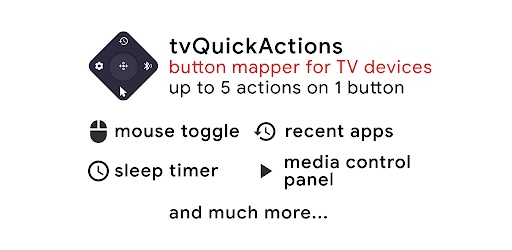
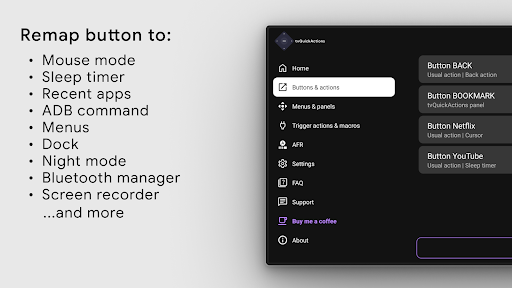
tvQuickActions is a button/key mapper developed specially for TV devices. Supports Android TV, Google TV and AOSP on most devices. One of the main unique features allows you to assign up to 5 actions to the button of your remote and add a lot of useful functions to your device. Features: * Dock with apps like in macOS/iPadOS * Recent apps on any device (including kill all apps) * Custom menus with any actions * User ADB commands as actions * Mouse toggle on any remote * Sleep timer * Dialpad * Screen recording * Night mode (screen dimming) * Bluetooth manager * Media control panel * Quick change TV input * Auto framerate feature for Amlogic devices based on Android 9-11 * Support remapping Netflix button on Xiaomi and TiVo Stream 4K devices * Support remapping app buttons on Xiaomi Mi Stick 4K and other devices In addition, you can set actions on power on, sleep entering or exiting, create custom channels for Android TV home from menus and lock apps. So it looks like the most interesting mapper for TV devices. Even if you don't have a button you don't need, there is a button that is rarely used. And with a double click, you can perform its usual action. You can also choose from different actions: * Open the app or app’s activity * Shortcuts & intents * Keycode * Open power dialog * Go home * Open recent apps * Go to the previous app * Open the Voice Assistant (both voice or keyboard interaction) * Toggle WiFi * Toggle Bluetooth * Toggle Play/pause media * Fast forward/rewind * Next/previous track * Open media control panel (with play, pause, stop, next/previous track) * Take a screenshot (Android 9.0+) * Open a URL * Open settings IMPORTANT! The app uses AccessibilityService API to remap button (a basic requirement for remapping to work, It is needed so the app can listen to and block key events) and AutoFrameRate (it is needed to get views on screen and emulate presses to automatize mode selecting). IMPORTANT! Some actions may not work on your device. It depends on many factors such as your firmware, Android version etc. Please notify the developer if something goes wrong and refrain from giving the app a poor rating since the issue is often out of the developer's control.
What's New
Latest version 3.6.0 with bug fixes and performance improvements
Enhanced security and stability
Optimized for better user experience
Kullanıcı Yorumları
10 yorum
Hattan Bashir
8 ay önce
The ability to send HTTP requests to my Home Assistant server unlocks unlimited potential. I can now control my lights, AC, HTCP, I can even now automate when any media from certain apps plays, automatically turn off the lights. Skies the limit! But I would still like a feature of having multiple profiles, imagine having a profile for your tv, and after a click of a button, you change your profile and now you remote is controlling your old VHS, using HTPP request -> HA -> Universal IR remote.

Shane T
3 yıl önce
Took my TCL Google TV from useless (why in the world would physical antenna input get a dedicated button?) and inconvenient (I don't have Netflix, one of only three mapped inputs) to perfect and usable. Other similar apps couldn't map directly to TV inputs but this one can, and the selection panel option when remapping is great for expanding functionality. UI is very intuitive, your app is terrific!
Thank you ❤️

Shahin
2 yıl önce
The $4 I spent on this app was money well spent. While the developer markets the app as a remote button remapper, it offers much more than that. The app provides a plethora of customization options and tools, including an extra menu, dock, shortcuts, and more. It’s a great app if you want to customize your Android/Google TV.
Thank you for the review 🙂
Developer
Trusted developer with verified applications on our platform.
App Information
Download Stats
Safe Download
This app has been verified and is safe to download. No malware detected.








