

Screenshots




About this app
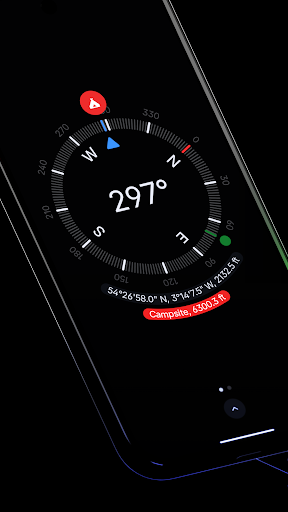
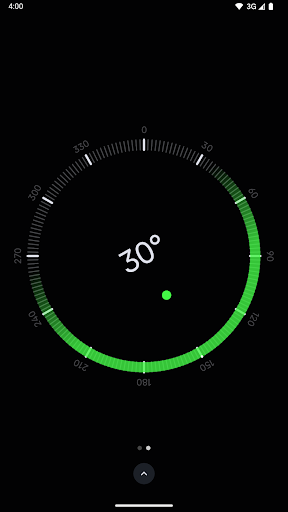
Discover the perfect blend of simplicity and elegance with Compass, the sleek and minimalistic app designed to guide you effortlessly. Featuring a modern, dark-themed interface, Compass provides a clear and intuitive display that ensures ease of use and precise navigation. Available on both Android phones and select Wear OS smartwatches, offering flexibility and convenience wherever you go. Key Features • See your exact location's coordinates along with altitude. Supports formats like DMS, DDM, DD, UTM, MGRS, and OLC (Plus Codes). • Save places to easily see their direction and distance from you. • Dock the compass to the edge of the screen while using other apps. • Adjusts for geomagnetic declination by aligning with true north for even more accurate navigation. • Easily check the level of any surface with the integrated bubble level feature. • Follow a simple and intuitive calibration guide that ensures accurate readings. • Measure the angle difference between two orientations. • Change units for angles, distances, and coordinates to suit your preference, offering flexibility in how information is displayed. Supports units like Azimuth or Quadrant Bearing for angles; and Metric, Imperial, or Nautical Miles for distance and altitude. • Switch between dark and light themes to match your preference or lighting conditions. • Personalise the appearance of the app by using Android 12's dynamic colours feature, which changes the app's colours to match your wallpaper. • The red screen filter option allows you to see better at night by reducing the light pollution produced by the screen. (Requires Android 10+) • Feel every turn with rich haptic feedback, providing a tactile experience as you navigate. • Switch to a high contrast display for better visibility in various lighting conditions. • View the current magnitude of the magnetic field around the device in micro-Tesla units. Includes an anomaly detector to alert you when a nearby object is interfering with the compass sensor. • Use the app anywhere, without needing an internet connection. There are no trackers or analytics, making it one of the most private compass apps available, respecting your privacy at all times. • Stay focused on your journey without interruptions from ads. Compass is essential for explorers, hikers, travellers, carpenters, and DIY enthusiasts who value aesthetics, functionality, and privacy. Download now and experience the difference!
What's New
Latest version VARY with bug fixes and performance improvements
Enhanced security and stability
Optimized for better user experience
Kullanıcı Yorumları
10 yorum
Matt D
1 yıl önce
After looking for a compass app that didn't require an absolute glut of privacy infringing permissions, I considered making my own but was told about this app. I gladly paid 0.99. This app doesn't need any special permissions to work. Buy it, you won't be disappointed, and it helps support a developer who clearly wants to keep your privacy intact.

Marty F.
1 yıl önce
I once saw the compass app on an iPhone, and thought it was very nice. I was surprised that I had trouble finding one for Android. When I heard about this one, I downloaded it, and it is just what I had been looking for. Simple, has everything you'd need plus a nice bubble level. It all looks great, too.

Sam Romano
1 yıl önce
Calibration is a pain, but that's not the developers fault. Straight forward and easy to use compass that does it's job! Appreciate the active development! (Update: Calibration process resets if screen rotation activates during calibration process)
Hi Sam, thanks for the update! The reset is only a bug in the interface. If you have already rotated your phone in the orientations indicated in the circle, then it shouldn't be a problem. Update: The latest version (1.6) fixes this issue. Thank you again for reporting it!
Developer
Trusted developer with verified applications on our platform.
App Information
Download Stats
Safe Download
This app has been verified and is safe to download. No malware detected.








