Screenshots




About this app
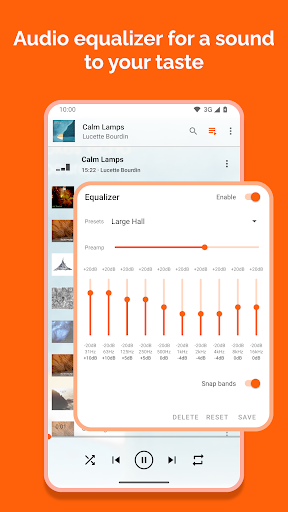
VLC media player is a free and open source cross-platform multimedia player that plays most multimedia files as well as discs, devices, and network streaming protocols. This is the port of VLC media player to the Android™ platform. VLC for Android can play any video and audio files, as well as network streams, network shares and drives, and DVD ISOs, like the desktop version of VLC. VLC for Android is a full audio player, with a complete database, an equalizer and filters, playing all weird audio formats. VLC is intended for everyone, is totally free, has no ads, no in-app-purchases, no spying and is developed by passionate volunteers. All the source code is available for free. Features –––––––– VLC for Android™ plays most local video and audio files, as well as network streams (including adaptive streaming), DVD ISOs, like the desktop version of VLC. It also support disk shares. All formats are supported, including MKV, MP4, AVI, MOV, Ogg, FLAC, TS, M2TS, Wv and AAC. All codecs are included with no separate downloads. It supports subtitles, Teletext and Closed Captions. VLC for Android has a media library for audio and video files, and allows to browse folders directly. VLC has support for multi-track audio and subtitles. It supports auto-rotation, aspect-ratio adjustments and gestures to control volume, brightness and seeking. It also includes a widget for audio control, supports audio headsets control, cover art and a complete audio media library. Permissions –––––––––––– VLC for Android needs access to those categories: • "Photos/Media/Files" to read your all media files :) • "Storage" to read your all media files on SD cards :) • "Other" to check network connections, change the volume, set the ringtone, run on Android TV and display the popup view, see below for details. Permission Details : • It needs "read the contents of your USB storage", in to order to read your media files on it. • It needs "modify or delete the contents of your USB storage", in order to allow deletion of files and store subtitles. • It needs "full network access", to open network and internet streams. • It needs "prevent phone from sleeping" in order to prevent... your phone from sleeping when watching a video. • It needs "change your audio settings", in order to change audio volume. • It needs "modify system settings", in order to allow you to change your audio ringtone. • It needs "view network connections" in order to monitor whether device is connected or not. • It needs "draw over other apps" to start the custom picture-in-picture widget. • It needs "control vibration" to give feedback on the controls. • It needs "run at startup" to set recommendations on Android TV launcher screen, only used on Android TV devices. • It needs "microphone" to provide voice search on Android TV devices, only asked on Android TV devices.
What's New
Latest version VARY with bug fixes and performance improvements
Enhanced security and stability
Optimized for better user experience
Kullanıcı Yorumları
10 yorum
thegamemaster8
1 yıl önce
Came highly recommended when I needed a new App for all the Music I have on my SD Card because YouTube Music decided to make it unnecessarily difficult to access them (by taking a dog's age to access them) while refusing to let me make playlists with them. Only issue I have is the inability to rename playlists. It's an extremely minor nitpick, so no worries. Excellent App for my music collection, with great audio quality. It also seems that it doesn't use a whole lot of battery life either.

Christopher Galletta Stevens (ChrusherComix)
1 yıl önce
The only music player on my phone. It does a great job of organizing music by artist, album, year, whatever I want, and uses the album art, which not only is esthetically pleasing, but helpful in organizing and finding what you're looking for. Also works for video, which particularly on my laptop computer is far and away my favorite as well. My go-to on both mobile and PC.

Disciple
1 yıl önce
I've been using your app for years, and I have only one complaint: please adjust your randomizer. I have over 700 songs on my device, and your randomizer seems to play the same 20 songs every single time I use it, no matter how short a time I use it, especially if I start from track one. Weirdly, it gravitates to the same songs even if I don't start at one. With 700+ tracks, I don't get why it does this, the odds are too high for them to play so often.
Developer
Trusted developer with verified applications on our platform.
App Information
Download Stats
Safe Download
This app has been verified and is safe to download. No malware detected.
You Might Also Like
More apps from Video Players & Editors category


Video Downloader - XDownloader
Download Videos App Tools


VITA - Video Editor & Maker
SNOW Corporation


iWebVR Pro
Panagola Private Limited


Slideshow Maker Photo Video
Govo Tech


AI Video Maker With Music
Aquaworld Infotech


Video Downloader & Player
Innometrics Enterprise