
Screenshots





About this app
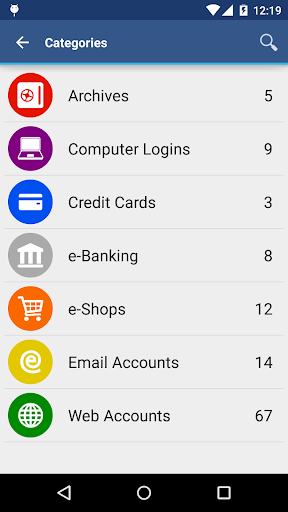
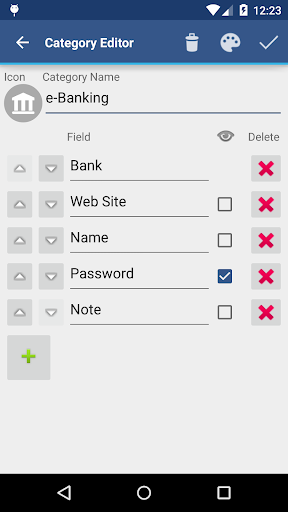
• Securely stores your passwords, credit card information, e-banking credentials, web accounts and other custom data. • Synchronizes encrypted data with your own cloud account: Dropbox or Google Drive. • There is a built-in Editor for changing or creating new data Categories with custom icons. • Search within fields. • Contains no advertisements. • Supports backup and restore of the encrypted data file to the Android USB device. • Export of unencrypted data in CSV format to the USB device. • There is an Auto lock feature that can be preconfigured for a specific period of time. PRO FEATURES, included: • Unlock with fingerprint (on a compatible device with Android 6 or later) • Unlock with face (on a compatible device with Android 10 or later) • Password Generator • CSV Import SECURITY FEATURES • All data is encrypted, including Entry names, Category definitions and the data itself. • Encrypts data using AES or Blowfish algorithms with key sizes of 256, 192 or 128 bits. • When the data file is decrypted, up to all combinations of algorithm and key size are tried with the Master password to unlock the data file. This makes brute force attacks longer. The app itself does not store any hint to the actual cipher or key size. • Uses a randomly generated 'salt' combined with the Master password. Salt helps to protect from off-line dictionary attacks. • The key to open the data file is created by combining your master password with the 512-bit 'salt'. The result is hashed 1000 times by SHA-256. Repetitive hashing makes a brute force attack more difficult. • Supports auto destruction of the data file after a predefined number of unsuccessful unlocks have been tried. For more info see http://www.awallet.org/ If you like this App, rate it in Google Play. If you have any suggestions, just let me know.
What's New
Latest version 11.0.0 with bug fixes and performance improvements
Enhanced security and stability
Optimized for better user experience
Kullanıcı Yorumları
10 yorum
Arne Bendixen
4 yıl önce
Just transferred all my passwords, addresses, etc. to my new phone. Re-installed the app from Play store without having to buy it again. Nice deal! Everything came over easy and works just like it used to. I also backed up to an SD card before transferring, just to be safe. This app works so well and has all the features I need in a password manager.
Thanks for your review and feedback Arne. We are glad you are appreciating this!

Steven Gallardo
4 yıl önce
I was simply looking for a place to store passwords. I got SO MUCH MORE. Secure whatever data you want here, that's the given. My favorite things about this app are the customizable...everything! So, again, you can save whatever information you need to save, how you want to save it. And #2, I don't have to worry about losing the data when I switch phones (cloud version). This has become one of my most used, beneficial, and reliable apps.
Thank you so much for your review!

Jeannee R.
5 yıl önce
Edit: Thank you for the tutorial. It works! I've been using this app for years. Great app & very attentive customer service. ** There's an issue with the latest update. Prior to the update, I was able to copy username or password by pressing & holding on either. Now, I have to go into edit in order to copy either the name or the password. I have a Note 10+. This issue is inconvenient. Please see if this issue can be resolved.
Hello Jeannee, It is still possible to copy the text by touching the label (e.g. Name) which is to the left of the text. The new version now also allows long-pressing the value in the Entry Viewer to copy all or just part of the text.
Developer
Trusted developer with verified applications on our platform.
App Information
Download Stats
Safe Download
This app has been verified and is safe to download. No malware detected.
You Might Also Like
More apps from Productivity category











