
Screenshots




About this app
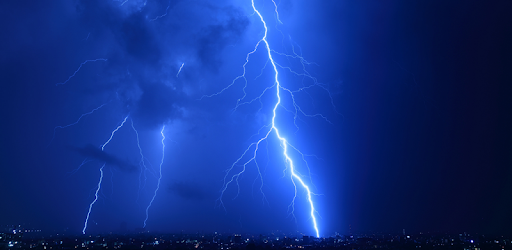
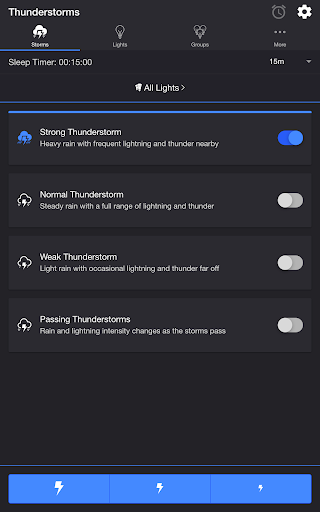
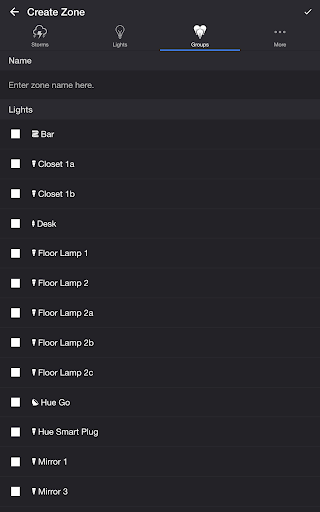
Summon a thunderstorm light show using your Philips Hue lights. Watch your lights pulse and flash to the sounds of a storm.* *Hue Bridge required THUNDERSTORMS • Strong Thunderstorm — Heavy rain with frequent lightning and thunder nearby Lights pulse quickly to the sound of heavy rain. Booming sounds of thunder accompany bright flashes of light. • Normal Thunderstorm — Steady rain with a full range of lightning and thunder Lights pulse to the sound of rain. The sound of thunder can be heard from various distances. The closer the lightning, the louder the sound, and the brighter the flashes of light! • Weak Thunderstorm — Light rain with occasional lightning and thunder far off Lights pulse slowly to the sound of light rain. Dim flashes of light are followed by soft sounds of thunder. • Passing Thunderstorms — Rain and lightning intensity changes as the storms pass Lights pulse and flash at different rates to correspond with the current strength of the storm. SETTINGS Sky • Change the base color and brightness of your lights Rain • Toggle rain sound effects • Change rain audio: Default, Heavy, Steady, Light, On Tin Roof • Change rain volume • Toggle rain light effects • Change rain pulse rate: Default, Slow, Medium, Fast • Target lights for rain light effects • Change rain transition effects: Pulse, Fade Quickly, Fade Slowly • Change color and brightness of rain light effects Lightning/Thunder • Toggle thunder sound effects • Change thunder volume • Change delay lightning (Wireless audio delay offset) • Toggle delay thunder • Toggle lightning light effects • Target lights for lightning light effects • Change lightning transition effects: Random, Flicker, Flash, Pulse, Fade Quickly, Fade Slowly • Change lightning/thunder occurrence: Default, Never, Occasional, Normal, Frequent, Unreal • Change color and max brightness of lightning light effects Passing Thunderstorms • Change starting storm for Passing Thunderstorms: Weak, Normal, Strong • Change cycle time for Passing Thunderstorms: 15m, 30m, 60m Background Sounds • Toggle background sounds: Birds, Cicadas, Crickets, Frogs • Change background sounds volume General • Change default end state: On, Off, Revert • Change sleep end state: On, Off, Revert • Select mode to automatically start when app opens • Choose time to automatically stop selected mode • Choose time to automatically restart selected mode when sleep timer ends, enabling recurring cycle LIGHTS / GROUPS Select one or more lights for your thunderstorm light show on the Lights/Groups tab. Choose a group that you set up using the Philips Hue app, or create a new zone in the Thunderstorm for Hue app. To edit a zone in the list, swipe the item to the left and tap the pencil icon. When you add, remove, or change lights, pull down the list to refresh. ADDITIONAL FEATURES • Lightning on Demand — Start a storm and utilize the lightning buttons at the bottom of the screen for manual control. • Sleep Timer — Set a timer complemented with an audio fade-out feature. Choose the state of your lights after the timer ends with the Sleep End State setting. • Bluetooth and Casting Support — Connect to Bluetooth speakers directly, or cast to Chromecast built-in speakers using the Google Home App. Adjust the Delay Lightning setting to offset any wireless audio delay. I'd love to hear your thoughts and appreciate you taking the time to rate the app. By leaving a review, I can continue to improve Thunderstorm for Hue and create a great experience for you and future users. Thank you! —Scott
What's New
Latest version 6.2.0 with bug fixes and performance improvements
Enhanced security and stability
Optimized for better user experience
Kullanıcı Yorumları
10 yorum
A Google user
6 yıl önce
OMG! This is amusing and wonderful! I bumped into this by accident and figured what the heck. It's only three bucks. Easy to use and quite enjoyable especially if you have a thunderstorm cranking out of your Bluetooth speaker. One footnote. It's more effective with lights you do not have direct line of sight to. For example a light bulb behind a lamp shade or in my case it was especially effective with the light strip hidden behind my television (reflecting off the wall). Thanks!
Thank you for your review!!

Valerie Rupe
5 yıl önce
Amazing app! The idea of an indoor thunderstorm popped into my head this morning and thank God Scott had already had this idea before me! It's everything I was hoping to find in this app (the fault is in Alexa. She can't open apps.) The light effects are so natural and lifelike. He really nailed this one. The thunderstorm takes me back to my childhood. I love the whole thing! The app creator is pretty swell, too.
A Google user
6 yıl önce
Really like this app. Great for Halloween. Lots of settings to play around with to get your desired effect. Even the background sounds help make for a great atmosphere. One question. Is there a way to have better control over the pulse rate or turn it off completely. Sometimes the pulse is to overwhelming even on lowest setting. Otherwise perfect.
Hi Ari, thank you for the rating and review! You can turn off the Rain Light FX under Settings. Please contact me at support@thunderstorm.scottdodson.dev if you need more help. Thanks!
Developer
Trusted developer with verified applications on our platform.
App Information
Download Stats
Safe Download
This app has been verified and is safe to download. No malware detected.
You Might Also Like
More apps from Entertainment category