
Screenshots




About this app
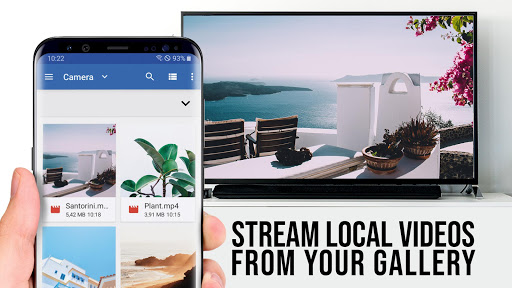
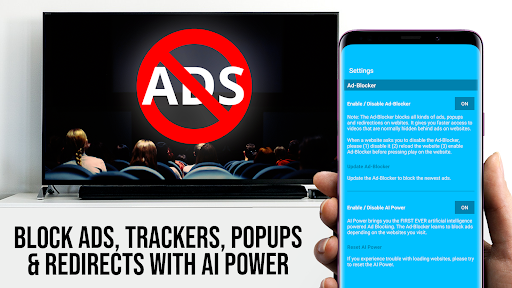
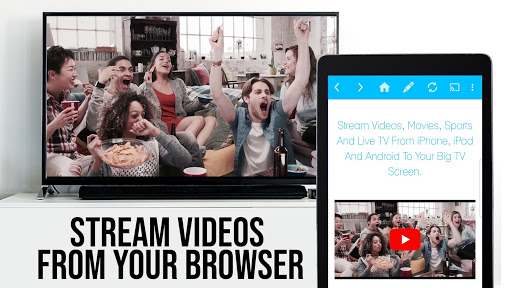
Upgrade your Samsung Smart TV and Blu-ray Player to watch webvideos, online movies, livestreams and live-tv shows directly on your biggest screen with the no#1 web video streamer. No additional streaming box required. Mp4, m3u8, hls livestreams, video over https and of course Full HD are supported. *** This PRO app edition includes all Premium Features unlocked. You can test the basic features in the FREE app edition *** *** This app works with all Samsung Smart TV models from 2010 (C series) to 2017 (new M/MU/Q series) and Blu-ray Player with Smart Hub or VEWD (formerly Opera TV) *** With Video & TV Cast you can browse through the web and stream or cast any video you want on your Samsung TV and Blu-ray Player. Just navigate to your favorite website and send the embedded video with a single tap to your Samsung TV / Blu-ray Player. The discovered video will be shown below the browser. A tap on the video link will send it to your Samsung TV / Blu-ray Player immediately. >>> IMPORTANT NOTES, PLEASE READ * To enable video casting please open the Samsung App Store on your TV or Blu-ray Player, browse to the videos category and install the free 'TV Cast' companion app. * Please enter the ip-address of your Android device by using the number pad and up/down/left/right keys on your Samsung Remote. * NOT SUPPORTED Videos: Flash video, Google Play movies, Netflix, Amazon and HBO and other DRM protected videos web-videos, online-movies, livestreams and live-tv shows. * Please test your websites and videos in the free edition! If casting fails, upgrading will NOT make it work magically. * The app does NOT mirror your full Android device, it just pushes the video part of a website to your Samsung TV or Blu-ray Player. * To play mp4, m3u8 or other videofiles directly on Samsung TV or Blu-ray Player just enter or paste the full video-url in the browser address bar. * Sometimes it is necessary to play the video on your Android device before the link gets detected for casting. * If the connection does not work, please try to restart your Android device, Samsung TV / Blu-ray Player and wifi router. * If a specific web-video, online-movie, livestream or live-tv show does not cast, please check our FAQ or send the website and video link to info@video-tv-cast.com by using the report feature in the app. We will try to add support for your video as soon as possible. Leaving negative Play Store reviews without any information about your issue will not give us a chance to help you. * Security Note: For your safety Video & TV cast only needs minimal Android permissions to work. Unlike others we do NOT access your identity data, accounts, device id, phone status, gps location or contacts. Please always check the required app permissions before you trust and install any Android app. * Refunds: Only within 24 hours after purchase. Please submit the Google Purchase ID. >>> PRO FEATURES * Remote Playbar: Use the Playbar for advanced video control while browsing, including video scrubbing, forward, rewind, play, pause, stop. The playbar works on all Samsung Smart TVs. * Ad-Blocker + No Sponsoring Ads: The Pro app version has no ads and the Ad-Blocker blocks ads & popups on most websites that you visit. You can enable/disable it at any time in the settings. * Bookmarks: Add and manage as many bookmarks as you want, either in the bookmarks menu or directly in the browser. * Desktop Mode: Change the browser user-agent and cloak your Android device as a desktop PC to load the desktop website instead of a mobile website. Please note that this will NOT enable video casting on websites that serve Flash videos in desktop mode. * Change Homepage: After purchasing this you can set your personal homepage in the settings. Disclaimer: This app is not affiliated with Samsung or any other trademark mentioned here.
What's New
Latest version 2.64 with bug fixes and performance improvements
Enhanced security and stability
Optimized for better user experience
Kullanıcı Yorumları
10 yorum
Jane Bland
2 yıl önce
I purchased the app this morning and never could figure out how to make it work. A few hours later, I discovered that it wasn't even necessary to screen share from my phone. So, a total waste of money and frustration. Update: After sering my comment, I was quickly issued a full refund. Thank you.
Thank you for taking time to update your review. We are glad that our support team could help you. Let us know if you have any further questions. We are always happy to help.

Girlie Isabel Umali-Requizo
1 yıl önce
Refund please... it just stopped working. Email sent. UPDATE: I emailed with the Purchase numbers and were refunded almost immediately. I re-installed again because I was able to fix the problem. I had to totally unplug my Smart TV so it would reset. Otherwise it would just hang. Then on your phone TV Cast app, edit the IP number, then choose mirroring, then buy the mirror app also when prompted. It works! Happy now!
Thank you for taking time to review our app and give us your detailed feedback. We really appreciate it and are glad you like our app. If you experience any further issues, please contact us via info@video-tv-cast.com. We are always happy to help.

Shaji Thomas
4 yıl önce
TV Cast Pro worked well for the first two months. I use it mainly to watch Youtube videos. Now it stopped working. Only an intro for 10 sec plays and stops. Other times the error message is 'searching for video link' and never connect. Extremely unhappy. Contacted customer service and after two weeks got message that developers are working on an update but never updated. Need attention as soon as possible. Thanks
Thank you for taking time to review our app. We apologize for the inconvenience. There is no update yet, as the developers are still working on the solution. We will try to release the update as soon as possible. Please update the app as soon as a new update is available. If you have further questions, contact us via info@video-tv-cast.com.
Developer
Trusted developer with verified applications on our platform.
App Information
Download Stats
Safe Download
This app has been verified and is safe to download. No malware detected.
You Might Also Like
More apps from Video Players & Editors category


Video Downloader - XDownloader
Download Videos App Tools


VITA - Video Editor & Maker
SNOW Corporation


iWebVR Pro
Panagola Private Limited


Slideshow Maker Photo Video
Govo Tech


AI Video Maker With Music
Aquaworld Infotech


Video Downloader & Player
Innometrics Enterprise