

Screenshots





About this app
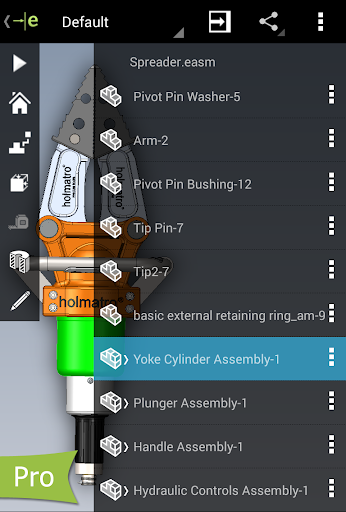
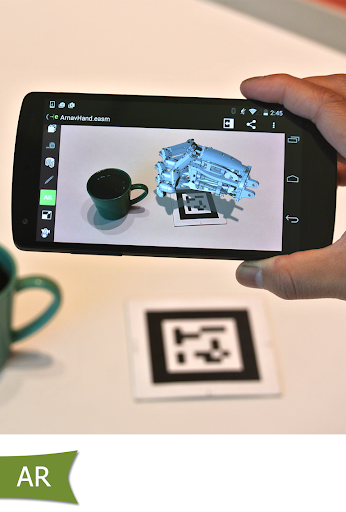
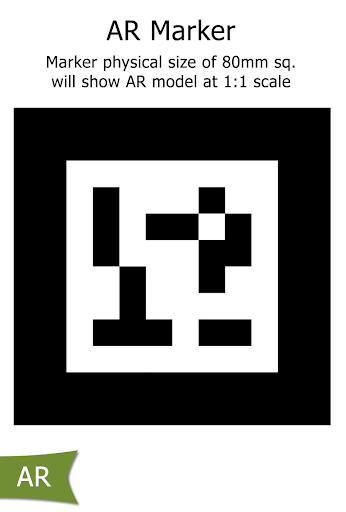
eDrawings Pro with in-app purchase. eDrawings® is the only CAD viewer on Android phones and tablets that allows you to view native eDrawings files as well as native SolidWorks® parts, assemblies and drawings files. eDrawings is the email-enabled communication tool that dramatically eases sharing of product design information. You can load and send files via email to collaborate more effectively with everyone involved in product development, including people who are not regular CAD software users to interpret and understand 2D and 3D designs. Multi-touch gestures let you pan, zoom, and rotate models easily. eDrawings also supports drawing sheets, and exploded views for eDrawings files published from SolidWorks®. Features: * Intuitive and easy-to-use user interface * Open 3D (EASM, EPRT, SLDASM, SLDPRT, IGES, IGS, JT, STEP, STP, IFC), 2D (EDRW, SLDDRW, DWG, DXF) and associated files from any source: email attachments, cloud storage services (Dropbox™, SkyDrive®, Google Drive, Hightail®, and others), web and FTP sites and network folders. * Zoom, pan and rotate your 2D or 3D CAD data using multi-touch * Animate 3D standard views * Browse your 2D drawing sheets * View your designs in full screen and double tap to fit it on screen * Sample files included Upgrade to eDrawings Pro using In-app purchase and enable new capabilities : * Measure your designs (distance, angles, lengths, point to point and more) * Dynamically view cross sections of your models in XY, YZ, or ZX directions from both sides and easily drag the cross section plane * Create markups in your designs, including text notes and freehand notations * Share marked up eDrawings files with others for review and further comments. All markups with history are saved within the eDrawings file. Thanks for using eDrawings! Don't forget to review the app. Your feedback is important to us! Please reach out to support@edrawingsviewer.com with any suggestions. Known Issue with Augmented Reality: Some devices clipped the Get Marker buttons and made them unavailable, you can now access them from the settings button in the top right corner when in AR mode For more information, visit http://www.solidworks.com or http://www.edrawingsviewer.com
What's New
Latest version 33.3.0008 with bug fixes and performance improvements
Enhanced security and stability
Optimized for better user experience
Kullanıcı Yorumları
10 yorum
A Google user
5 yıl önce
An update. The app is finally working again. Thank you so much. The app repeatedly crashes immediately after opening. I have filled out multiple crash reports over a three month period. The crash report contains all relevent information regarding my device and version of app running. I am expecting a more detailed response than sending yet another crash report to an alternate address. I also expected a better response time from a team associated with solidworks.
Hi User, Thank you for getting in touch regarding the app. If you have time, Can you provide some further information, for example, some screenshot or video demonstrating the issue at your end by creating a Service request on below link: http://www.edrawingsviewer.com/ed/edrawings-support.htm Thanks, eDrawings Support Team.

M8
2 yıl önce
Simply an amazing app. Dont know why it got bad reviews. It is exactly like I expected. Cost a bit to get the measure and section tools but it was worth it. Have the files locally on the phone or google drive. Some options I wish was in the app is; 1. On the start screen have the option to choose "recent files" or "specify a directory", the app then list all files in that directory. 2. When you press add file it either defaults you to "latest used directory" or option to choose default folder.
Hi User, Thank you for your feedback. We are glad that you liked our app! If you need assistance with the eDrawings app feel free to contact eDrawings Support at the below link: http://www.edrawingsviewer.com/ed/edrawings-support.htm Thanks, eDrawings Support Team.

Sam Hepworth
4 yıl önce
Worked mostly flawlessly untill a recent update and the couldn't even install just throws up errors. Edit: tried troubleshooting steps suggest with no result same error. Edit2: latest update fixes the install problem but was still very frustrating especially when the troubleshooting was generic google play troubleshooting and did not work. Next time please check steps could work for your problem before recommending.
Hi User, We are aware of this issue and we are working on this, a workaround option is to use steps mentioned at https://support.google.com/googleplay/answer/7513003?hl=en Hope this helps. Thank you for your time and efforts. Thanks, eDrawings Support Team.
Developer
Trusted developer with verified applications on our platform.
App Information
Download Stats
Safe Download
This app has been verified and is safe to download. No malware detected.
You Might Also Like
More apps from Productivity category











