
Screenshots




About this app
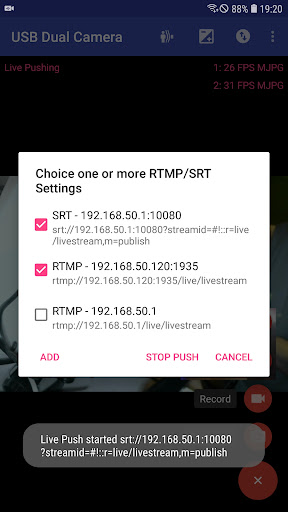
Tip: * Supports UVC WebCam WITH microphone and UVC video grabber WITH audio input(Up to 4K via HDMI, Supports progressive and interlaced video). MJPEG(or H.264, H.265, HEVC) format is required when using 2 cameras at the same time. * Windows Hello Camera and IR Camera * Geek szitman supercamera(2ce3:3828)non-UVC devices, e.g. USB Endoscope Please use a good quality OTG cable and ensure power supply Please ensure that the 2 cameras have sufficient power supply. It is recommended to use HUB with external power supply! Some devices may need to bridge HUB to work properly, e.g. Elgato Cam link. Using HEVC for video recording/streaming requires Android 5.0 or above, and the device must supports HEVC codec. Using AV1 for video streaming requires Android 10 or above, and the device must supports AV1 codec. See the video for more info: https://youtu.be/B569qfWx83U "USB Dual Camera" can let your android device connect to 2 USB WebCams or video capture cards via USB-OTG at the same time. You can record video or capture snapshot., OR turn your phone into a wireless IP Camera via build-in RTSP and HTTP Server for security monitoring WITH Bi-directional audio support, you can use your browser to view, of course, include "IP Camera" App. "USB Dual Camera" can push the video and audio to RTMP/SRT live media server and use for network live broadcast. It supports the rtmps security protocol and SRT protocol and it can also push the media to multiple media server at the same time. It also supports HEVC/AV1 over RTMP and can be used for YouTube Live currently. "USB Dual Camera" can mix USB Audio with a built-in microphone or system audio and output, or overlay the built-in camera/screen video onto the external camera video. "USB Dual Camera" can record video into two mp4 files synchronously if you connect to 2 USB WebCams at the same time and record. This feature can also records audio separately if both of the cameras have audio input. It can also set to create full Side-by-Side (SBS) 3D video. You can use your 3D video player to view 3D video. It can mix audio automatically if both cameras have audio input. "USB Dual Camera" can add timestamp, GPS, speed and other info on the video frames while recording. Or overlay the built-in camera video onto the external camera video. "USB Dual Camera" supports loop-recording. Can set auto-segment when recording and auto-delete old video archives when no enough storage. "USB Dual Camera" can be used as "Dash Cam" USB Dual Camera can seamless switching between foreground and background. Just press 'Enter background' from menu. The recording will not interrupted during switching! It support auto video recording which based on Motion Detection and the video record can be uploaded to FTP server automatically and notify you via Email! Bi-directional audio requires IP Camera App, you can get it from https://play.google.com/store/apps/details?id=com.shenyaocn.android.WebCamPro IMPORTANT! On Android 9 and above, Camera permission is required to get fully USB Video device access. This is userspace driver so it used for the app only. Android does not allow to install kernel driver so it unable to use for third-party apps.
What's New
Latest version VARY with bug fixes and performance improvements
Enhanced security and stability
Optimized for better user experience
Kullanıcı Yorumları
10 yorum
t. z.
5 yıl önce
Great - I have a large pickup with a brush bar, and now have two USB cameras which make parking, or even seeing when I'm emerging from a narrow alley easy. It also records and streams. The only thing I would add is a 90 degree left or right rotation so I could see more below than to the left or right.

A Google user
6 yıl önce
Works great. Can you please add 3D SBS metadata for upload file to YouTube?
Thanks, I will try to do that.

Oliver Ford
5 yıl önce
Setting up front and rear viewing video cameras on an ODroid based self-built car head unit. After lots of attempts with 'dashcam' apps, which all failed in various ways, this works flawlessly. Best thing is that the app gives all the details and options of the hardware and doesn't treat the user like an idiot. Thanks, great work!
Developer
Trusted developer with verified applications on our platform.
App Information
Download Stats
Safe Download
This app has been verified and is safe to download. No malware detected.
You Might Also Like
More apps from Video Players & Editors category


Video Downloader - XDownloader
Download Videos App Tools


VITA - Video Editor & Maker
SNOW Corporation


iWebVR Pro
Panagola Private Limited


Slideshow Maker Photo Video
Govo Tech


AI Video Maker With Music
Aquaworld Infotech


Video Downloader & Player
Innometrics Enterprise