
Screenshots




About this app
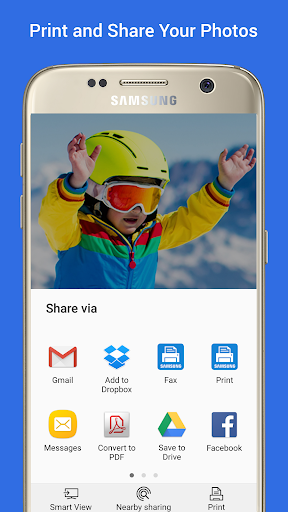
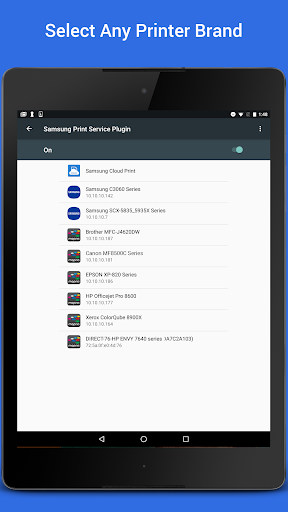
Easily print photos, web pages and documents without downloading any additional apps or printing tools. Allows you to share your life’s printable moments and stay productive at home, at work or while on the go. The Samsung Print Service is a system tool that enables wireless printing to Samsung printers and many other printer brands by integrating Mopria technology. Nearly all new printers sold today by Brother, Canon, Dell, Epson, Fuji Xerox, HP, Konica Minolta, Kyocera, Lexmark, Pantum, Ricoh, Samsung, Sharp, Toshiba and Xerox are Mopria-certified to make it easy to print your photos, web pages, documents, coupons, recipes and files from your favorite apps. You can even control print settings including color, number of copies, paper orientation and double-sided printing. If you own a Samsung Galaxy phone, this system tool is already pre-installed. For any Android phone or tablet running KitKat (4.4) or higher, installing this plug-in will enable easy mobile printing from your device. PHONE AND TABLET COMPATIBILITY Samsung Galaxy Phones/Tablets – The Samsung Print Service plug-in is pre-installed on S4, S5, S6, S7 and many other Samsung phones & tablets. This plug-in cannot be uninstalled or moved to a SD card. When plug-in updates are available your device will notify you. Please adjust your settings to automatically update this plug‐in, or accept updates manually. For any other Galaxy phone or tablet where this Plug-in is not pre-installed, it can be downloaded and installed as long as the Samsung device is running Android KitKat (4.4) or later. Other Android Phones/Tablets – The Samsung Print Service will work with any device with Android KitKat (4.4) or later. KitKat was the first version of Android that included the “Android Print Framework” which allows an Android App to access a built-in printing system. When updates are available for the Samsung Print Service, your device will notify you. APPS SUPPORTING PRINT Check to see if your Android App supports printing by looking for a print icon, checking the App’s menu option (three dots, three lines or “More” menu) or using the “Share” function. Some everyday apps that support printing include Gallery, Photos, Chrome, Gmail, Box, Dropbox, Google Drive, Adobe Reader, Microsoft Excel, Word and PowerPoint. Many more apps have enabled print or allow you to share to the Samsung Print Service. TURNING ON THE SAMSUNG PRINT SERVICE If you are unable to locate any printers, you may need to enable the Samsung Print Service. Go to your device “Settings” and search for “Printing” to locate the Samsung Print Service. Then toggle the switch from “Off” to “On”. SUPPORTED PRINTERS Brother, Canon, Dell, Epson, Fuji Xerox, HP, Konica Minolta, Kyocera, Lexmark, Pantum, Ricoh, Sharp, Toshiba and Xerox branded printers are supported. However not all models are Mopria-certified. See http://mopria.org/certified-products to check whether your printer model is supported. Samsung Printers M2020/2070/283x/288x/262x/282x/267x/287x/4370/5370/4580/5270/4530/403x/408x/ 301x/306x/5360 Series C410/460/420/470/430/480/1810/1860/2620/2670/268x/140x/145x/4820/3010/3060/3 51x/401x/406x Series CLP-300/31x/32x/350/360/610/620/660/670/680/770/775 Series CLX-216x/316x/317x/318x/838x/854x/9252/9352/92x1/93x1 Series ML-1865W/2150/2160/2165/2250/2525/257x/2580/285x/2950/305x/3300/347x/331x/37 1x/405x/455x/551x/651x Series SCX-1490/2000/320x/340x/4623/4x21/4x24/4x26/4x28/470x/472x/4x33/5x35/5x37/65 45/6555/8030/8040/8123/8128 Series SF-650, SF-760 Series SL-J1760/2920/2960/3520/3560/5520/5560 Series
What's New
Latest version 3.11.250805 with bug fixes and performance improvements
Enhanced security and stability
Optimized for better user experience
Kullanıcı Yorumları
10 yorum
A Google user
7 yıl önce
I've been struggling a lot with the Samsung Mobile Print app the Samsung printer directed me to, so when I discovered this plugin works with the printer too I downloaded it immediately, since anything is better than that other app. I'm pleasantly surprised at how well this one works! Hard to believe they're made by the same company. It took me a tenth of the time to print with this than it did with the other app, and it was super easy to figure out how to use.

Robert Oh
5 yıl önce
It work well, no frills. No advanced features, but allows you to print to your printer and gives you a preview of the print job. You will have to rely on the app you are sharing from --that's how to get print to samsung printer in most apps -- to format what you are printing. I have accidentally found out the app will let you print to ALMOST ANY network printer with surprisingly good results. Would have given 5 stars if it allowed more advanced settings -- at least for samsung printers.

Jack mclathass
3 ay önce
it works, unless you need to print from an email with a web address or link in it. than the app will download and print the content of the link and forget about the email. disappointing
Developer
Trusted developer with verified applications on our platform.
App Information
Download Stats
Safe Download
This app has been verified and is safe to download. No malware detected.
You Might Also Like
More apps from Productivity category











