

Screenshots



About this app
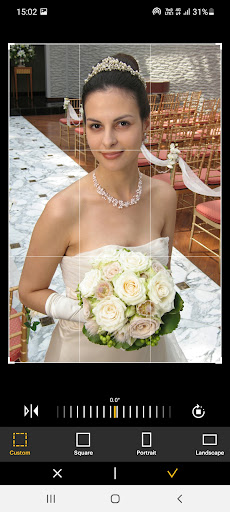
The new features including the AR and beauty functions will blow you away! Thanks. Supported Models : Kodak 2 inch Printer (P210, M200) Kodak 2 in 1, 2 inch Camera (C210, MS200) Kodak 3 inch Square Printer (P300, M300) Kodak 3 inch Square 2 in 1 Camera (C300, MS300) Kodak 4inch Square Camera (MS400) Kodak 6 inch Dock Printer (PD460, D600) [How to Use] 1. Connect the printer to a power source. (For battery models, make sure the battery is sufficiently charged. For adapter models, use the provided adapter.) 2. Turn on the printer. 3. Make sure there is enough cartridge and paper in the printer. 4. Open the app and tap the Bluetooth icon at the top. In the list of paired or discovered devices, find your printer’s name and tap to connect. 5. If you cannot find the printer name in the app, go to your phone’s Bluetooth settings and search for the MAC address. The MAC address is located inside the printer’s door. For Dock Printers, dock your smartphone at the pin on top, or find the MAC address on the underside of the printer to connect via Bluetooth. 6. Select an image from your Gallery or take a photo with your smartphone. 7. After selecting an image, edit it as you like. 8. When editing is complete, press the print button located on top of the printer. 9. For the first print, a firmware update may be required. Please follow any on-screen instructions on your smartphone. 10. Printing takes about one minute. Please do not pull out the photo until it is completely ejected.
What's New
Latest version 5.0.5 with bug fixes and performance improvements
Enhanced security and stability
Optimized for better user experience
Kullanıcı Yorumları
10 yorum
Tasha English
3 ay önce
Amazing prints. Great quality and easy to set up. Lightweight and compact. Makes a great gift or money saving trips instead of paying extra to have prints developed elsewhere. Very satisfied!!!

Anubis Reviews
1 yıl önce
Great app but I'd love to see a feature to print passport photos. it would be great if it would highlight a square the size of a passport photo and you move it over and adjust the face in the square and hit select. then it duplicates that face 6 or eight times on 1 sheet to be cut out individually. this way people can get the proper size photos for wallets and passports without having to schedule at the post office or with a photographer.

Ruth Wolf Minecraft Girl
8 ay önce
really cool watching it print. goes through a couple times, looks yellow, goes through a couple more times, comes out redish, then goes through again and comes our as the picture!! so cool. only thing, the picture printed does not have the same vibrancy as the photo on my phone. still comes out nice!! Just not quite as vibrant as the original.
Developer
Trusted developer with verified applications on our platform.
App Information
Download Stats
Safe Download
This app has been verified and is safe to download. No malware detected.
You Might Also Like
More apps from Photography category


Selfie Camera - Beauty Camera
iMediaStar


FaceFancy-Face Swap & AI Photo
SZYJ Technology


StyleSwap: Outfits & Faces
SkySoft Inc


AI Photo Editor: Gallery Vault
T21 Games


HD Camera: AI Beauty
UniStarSoft


Photo Album F-Stop Pro
Seelye Engineering