
Screenshots
About this app
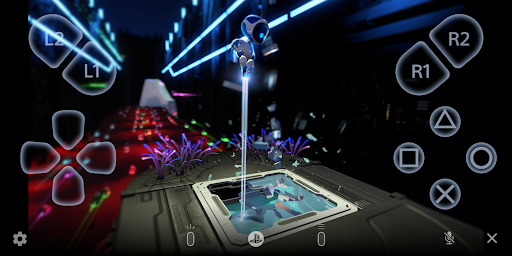
Use PS Remote Play to access your PS5™ or PS4™ wherever you go. With PS Remote Play, you can: • Display the PlayStation®5 or PlayStation®4 screen on your mobile device. • Use the on-screen controller on your mobile device to control your PS5 or PS4. • Use the DUALSHOCK®4 wireless controller. • Use the DualSense™ wireless controller on mobile devices with Android 12 or later installed. • Use the DualSense Edge™ wireless controller on mobile devices with Android 14 or later installed. • Use the Backbone One PlayStation® Edition on USB Type-C Android smartphones. • Join voice chats using the mic on your mobile device. • Enter text on your PS5 or PS4 using the keyboard on your mobile device. To use this app, you need the following: • A mobile device with Android 10 or later installed • A PS5 or PS4 console with the latest system software version • An account for PlayStation Network • A fast and stable internet connection When using mobile data: • Depending on your carrier and network conditions, you may not be able to use Remote Play. • Remote Play uses a lot more data than most video streaming services. Data charges may apply. Verified devices: • Google Pixel 9 series • Google Pixel 8 series • Google Pixel 7 series Using your Controller: • You can use the DUALSHOCK 4 wireless controller. (On devices with Android 10 and 11 installed, use the on-screen controller to use the touch pad function.) • You can use the DualSense wireless controller on mobile devices with Android 12 or later installed. • You can use the DualSense Edge wireless controller on mobile devices with Android 14 or later installed. • You can use the Backbone One PlayStation® Edition on USB Type-C Android smartphones. Note: • This app may not work properly on unverified devices. • This app may not be compatible with some games. • Your controller may vibrate differently than when playing on your PS5 or PS4 console. • Depending on your mobile device's performance, you might experience input lag when using your wireless controller. App subject to end-user license agreement: www.playstation.com/legal/sie-inc-mobile-application-license-agreement/
What's New
Latest version 8.5.1 with bug fixes and performance improvements
Enhanced security and stability
Optimized for better user experience
Kullanıcı Yorumları
10 yorum
M Roybal
3 yıl önce
Great app, easy to use. Being able to change resolution and frame rate settings is nice. If your internet connection is strong you probably won't have problems with lag. The only issue I have is when using a DS4 controller, the touchpad turns into a mouse when connected with bluetooth. This makes it difficult to open menus with the touchpad button. You can use the mouse to "double click" the onscreen touchpad but that is very inconvenient and can get you killed, depending on the game.

Cole TheMole
2 yıl önce
Good to have but a bit annoying. It is good for when someone else is using the TV and you want to play but is hard to use on vacation. You need to have good internet speed ------EDIT: I found out that if you press the PS button and the SHARE button at the same time on the controller and connect it on Bluetooth to your phone you can use your phone as a monitor. Much more useful now that I have found out this trick. It works for Apple and Android phones.

K . W
2 yıl önce
Fantastic when it works, frustrating when it doesn't. I've gotten hours of enjoyment out of the remote play app, but errors usually occur at least once during a play session. Some of these errors require you to re-link the app to your console by signing on to the same network or restart the console, which means you're out of luck until you go home again. Problems aside, I'll continue to use the app as it's the only option I know of to play PS5 on a mobile device. Tip: Use a bluetooth game pad.
Developer
Trusted developer with verified applications on our platform.
App Information
Download Stats
Safe Download
This app has been verified and is safe to download. No malware detected.
You Might Also Like
More apps from Entertainment category