
Screenshots


About this app
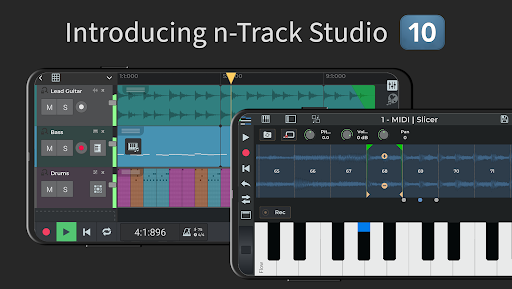
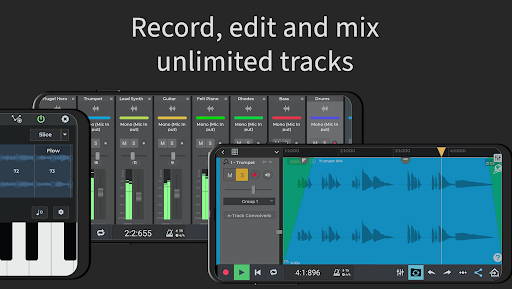
Turn your Android device into a powerful Music Production Studio. Record an unlimited number of Audio, Instrument & Beat Tracks, mix and add effects: from Guitar Amps, to VocalTune & Reverb. Then edit your songs, share them online & join the Songtree community to collaborate with other artists. Check out n-Track Studio Tutorials for Android https://ntrack.com/video-tutorials/android Try n-Track Studio for free: if you like it you can subscribe & unlock standard or advanced features* HOW IT WORKS: • Record a track with the built-in mic or an external USB audio interface • Add & edit audio tracks using our Loop Browser & royalty-free sample packs • Import grooves & create beats using our Step Sequencer Beat Maker • Create melodies using the internal keyboard with built-in virtual instruments. (You can connect external MIDI keyboards too) • Use the mixer to adjust volumes, pan, EQ & add effects • Save or Share the recording directly from your device MAIN FEATURES: • Record & edit audio tracks • Step Sequencer Beat Maker • Instrument tracks • Loop Browser & royalty-free sounds • Unlimited number of tracks (max 8 tracks without subscription) • Group & Aux channels • Piano-roll MIDI Editor • On-screen keyboard • EQ with 2D & 3D Spectrum analyzer + chromatic tuner* • VocalTune* pitch correction: automatically correct pitch imperfections on vocals and melodic parts • Guitar & Bass Amp plugins • Reverb, Echo, Chorus, Tremolo, Pitch Shift, Phaser, Distortion, Compressor, Denoiser, Lo-Fi, DynamicEQ, Arpeggiator & Convolution reverb effects • Built-in Metronome • Import tracks from your music library • Automate volumes, pan and effects using envelopes • Collaborate with other musicians using the built-in Songtree music making community • Languages included: English, Spanish, French, German, Italian, Portuguese, Russian, Indonesian ADVANCED FEATURES: • 64 bit audio engine* • Set sampling frequency up to 192 kHz (frequencies above 48 kHz require an external audio device) • Export 16, 24 or 32 bit audio files* • Live input monitoring • Follow Song Tempo & Pitch Shift dropdown menu on Audio Loops • Record 4+ tracks simultaneously from USB pro-audio devices such as Focusrite, M-Audio, Apogee etc* • Support for multiple audio output when using compatible USB devices* *Some features require one of the three available in-app subscription levels: FREE edition What you get: • Up to 8 tracks • Up to 2 effects per track / channel • Save your song online with the option to collaborate with other musicians NOTE: Saving to WAV/MP3 on your local device storage requires a purchase STANDARD subscription ($1.49/month) What you get: • Unlimited audio & MIDI tracks (Free edition is limited to 8 tracks) • Unlocks all the available effects (Free Edition has Reverb, Compression, Echo and Chorus) • Unlimited number of effects per channel (Free Edition has up to 2) • Export to WAV or MP3 EXTENDED subscription ($2.99/month) Everything in Standard edition, plus: • 64 bit audio engine • Multichannel USB class-compliant audio interfaces • Export in 24, 32 and 64 bit uncompressed (WAV) format (Standard Edition is limited to 16 bit WAV) • 3D frequency spectrum view SUITE subscription ($5.99/month) Everything in Extended edition, plus: • 10GB+ of Premium Royalty-Free WAV Loops & One-Shots • Exclusive release-ready Beats & editable n-Track Studio Projects • 400+ Sample Instruments
What's New
Latest version 10.4.155 with bug fixes and performance improvements
Enhanced security and stability
Optimized for better user experience
Kullanıcı Yorumları
10 yorum
Cactus521
4 yıl önce
Quite nice. What one gets for free is adequate for experimentation and the included synth (programmable) and free drum and sound kits are excellent. The sound is high quality, on a Chromebook the program really shines, with an on screen keyboard that can be played by touch. One can change the default 8 note polyphony to 32 note, and latency is not an issue on a chromebook. I did not opt for the paid subscription, just personal preference, I avoid that. Unobtrusive ads.

Underhillジン
3 yıl önce
I went through a lot of DAWs. I tried Reaper, ProTools, FL, Ableton etc. For PC and for Android. As a classical composer, a songwriter and someone who just likes to make all kinds of different music I found n-track to be by far the best designed ui/ux of any of them by a long shot. I don't want my DAW getting in the way of my process. I only wish they had more plugins for things like notation. Regardless, a huge bravo and a relief to find!

Kacy Chicoine
2 yıl önce
Great recording, so easy to use, and has a plethora of basic effects to really enhance your simple recordings. With Bluetooth headphones, the latency was terrible no matter what I tried. As soon as I switched to a cheapo wired pair of earbuds, the latency was gone. For a free app, it's amazing. Makes mixing multiple tracks so quick. With limited knowledge of DAWs you can easily enhance your songs compared to a simple recording app. Highly recommended!
Developer
Trusted developer with verified applications on our platform.
App Information
Download Stats
Safe Download
This app has been verified and is safe to download. No malware detected.
You Might Also Like
More apps from Music & Audio category
Audio Elements Pro
Rokaud


Spotify: Music and Podcasts
Spotify AB


Bose QC Earbuds
Bose Corporation
AudioLab Audio Editor Recorder
HitroLab - Mp3 Audio Editor and Ringtone Maker Dev

Musivibe - Enjoy Various Music
Acunsewer Media

AudioTool
jjbunn