

Screenshots




About this app
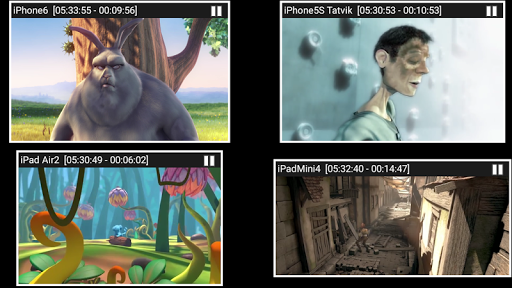
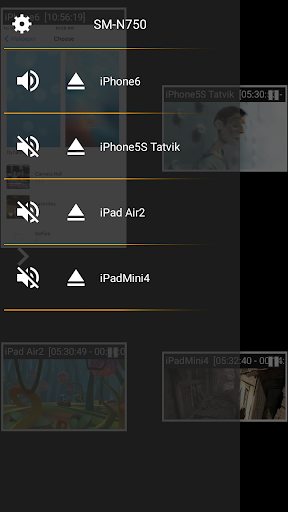
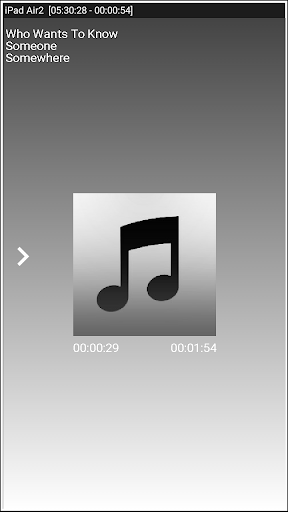
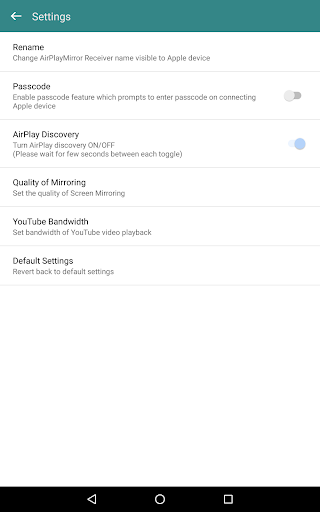
AirMirror is Receiver App on Android for Screen Mirroring and Casting from Apple devices. An Apple device can be an iPhone, an iPad, a MacBook or a iMac. Using AirMirror Receiver, the Android device can mirror screen of an Apple device or can playback audio/video/photos stored on Apple device or can play YouTube video link from Apple device over the local network. This is highly useful for sharing the screen and content of Apple device with family, friends, colleagues, customers or business partners. Features: ------------- o Mirroring of Screen of Apple Devices (iOS version 9 to 15). o Mirror/cast from up to 4 Apple devices simultaneously. o Playback of Apple device’s media content. o Slideshow of photos, images and videos of Apple device. o Restrict unauthorized user from sharing his Apple device using passcode feature. o Playback of YouTube free content from Apple device to AirMirror receiver. o Resize and move the mirroring/casting window in the App view. o Share game screen while playing game on Apple device. o Share game screen while playing game on Apple device. o Bluetooth Low Energy based advertising to mirror devices across different subnets. Instructions of using AirMirror App: 1. Launch AirMirror App on Android Device. The App will start advertising Android Device as a Receiver to screen mirror an Apple Device. The default name of the Receiver is Android Device’s name. 2. On Apple Device, enable Screen Mirroring and select AirMirror Receiver's name from the list. Enable Mirroring using the slider. The Apple device should be in the same network as the Android Device. 3. On AirMirror App, the list of Apple devices connected to the App are shown in semi transparent control-screen which slides out on touching ">". For unhindered mirroring, slide control -screen to left by swiping it to left or by touching outside the control-screen. 4. One can disconnect Apple device and mute/unmute the mirroring/casting by touching mirroring window in the App for about two seconds, or by going to control screen and perform disconnect and mute/unmute. 5. Touching Settings icon on the control-screen, the user can navigate to Settings, where user can rename AirMirror Receiver's name, enable/disable password for authentication, toggle AirMirror Receiver discovery to on/off, change quality of mirroring, set YouTube bandwidth, or reset to default settings. Known Limitation: 1. The app does not work with DRM protected content like Netflix, paid iTunes videos, paid Google Movies etc. 2. App has limited capability for Live TV from only some Apps or websites. You may reach us at sales@neoyantra.com. Disclaimer: Apple, iPhone, iPad, MacBook, iMac, Airplay, iTunes, YouTube, NetFlix, Google, Android etc. are trademarks/tradenames of their respective owners. We do not have any association with Apple or Google or any other entity.
What's New
Latest version 2.4 with bug fixes and performance improvements
Enhanced security and stability
Optimized for better user experience
Kullanıcı Yorumları
10 yorum
A Google user
7 yıl önce
For over a month, I’ve been researching the gazillion different ways to mirror (not just cast to certain apps) my iOS devices (iPad and iPhone) to my android TV. Sony 900F series with a Sonos sound bar connected (TV and iOS devices on same network - TV is connected via Ethernet cable, mobile iOS devices by WiFi) This app did exactly what I wanted (what we ALL want) without any trouble whatsoever. It’s now an icon next to the Netflix, Prime, Plex, etc apps. Click it. It loads in <15 seconds. Go to the screen mirroring setting on my iOS device. The TV is listed. Click it. Mirroring with perfect screen and sound (lag is almost unnoticeable). Before you buy this, just D/L the demo version (separate app) to confirm it works and then drop the $5 on this (full) version. It’s exactly what I was looking for. Thanks to the development team!

Blanca Paz
5 yıl önce
It is quite a good app, sometimes the mirror image gets disconnected, and the mobile device can't find the tv while I'm on a call or on another app. But I think it works just fine
A Google user
6 yıl önce
Works wonderfully! Exactly as described. Connecting is simple and solid. Terrific app for acting as an Airplay receiver.
Developer
Trusted developer with verified applications on our platform.
App Information
Download Stats
Safe Download
This app has been verified and is safe to download. No malware detected.
You Might Also Like
More apps from Video Players & Editors category


Video Downloader - XDownloader
Download Videos App Tools


VITA - Video Editor & Maker
SNOW Corporation


iWebVR Pro
Panagola Private Limited


Slideshow Maker Photo Video
Govo Tech


AI Video Maker With Music
Aquaworld Infotech


Video Downloader & Player
Innometrics Enterprise