
Screenshots






About this app
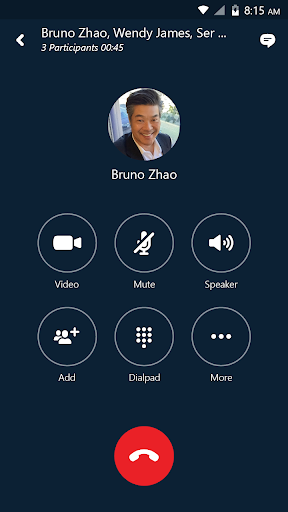
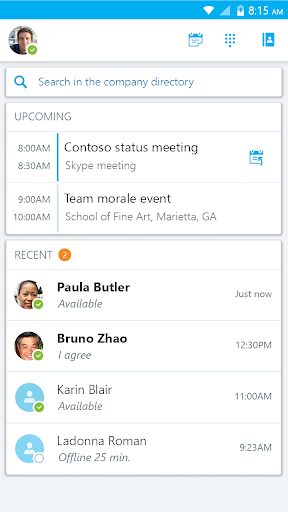
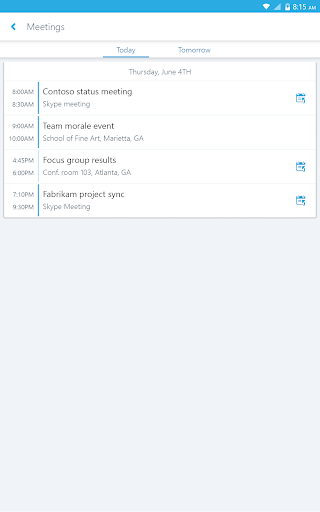
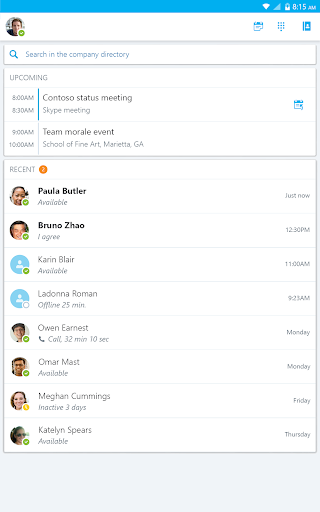
Skype for Business, formerly Lync 2013, for Android extends the power of Lync and Skype to your favorite mobile device: voice & video over wireless, rich presence, instant messaging, conferencing, and calling features from a single, easy-to-use interface. Key Features: -Initiate a group IM or video conversation and invite additional participants -Join, rejoin and initiate a Skype for Business Meeting to communicate and collaborate on amazing ideas -Share your video and view speaker's video during a conference -Control the meeting (mute or remove attendees) and know more about participants’ modalities -Look at your upcoming meetings and join via one click -Find your recent conversations and pick them up from where you left -Search your contacts by name, email, or phone number -Enhanced security via Active Directory Authentication Library (ADAL) Anyone can use the Skype for Business Mobile app when invited to a Skype for Business or Lync 2013 meeting. However, you must have a Skype for Business or Lync account in order to use (and enjoy) the full capability of the Skype for Business Mobile app. Also, some functionality might require an update to Lync or Skype for Business Server or might not be available to all users. If you’re not sure about your account status, please contact your IT department IMPORTANT: THIS SOFTWARE REQUIRES CONNECTIVITY TO VALIDLY LICENSED COPIES OF MICROSOFT LYNC OR SKYPE FOR BUSINESS SERVER OR OFFICE 365 / LYNC ONLINE / SKYPE FOR BUSINESS ONLINE AND WILL NOT WORK WITHOUT IT. UPDATES TO MICROSOFT LYNC SERVER OR SKYPE FOR BUSINESS MAY BE REQUIRED FOR PROPER PERFORMANCE. SOME FUNCTIONALITY MAY NOT BE AVAILABLE IN ALL COUNTRIES. IF YOU ARE UNSURE ABOUT YOUR COMPANY’S LICENSE TO AND/OR DEPLOYMENT OF LYNC OR SKYPE FOR BUSINESS, PLEASE CONTACT YOUR IT DEPARTMENT. SKYPE FOR BUSINESS APP IS ONLY AVAILABLE FOR Android 4.0 OR GREATER.
What's New
Latest version VARY with bug fixes and performance improvements
Enhanced security and stability
Optimized for better user experience
Kullanıcı Yorumları
10 yorum
A Google user
6 yıl önce
It is usually reliable and easy to access meetings. Getting out of certain screens can be non-intuitive, like when I tap the speaker icon box to expand it, then I had to pause to figure out how to get back to the presentation being displayed. I actually got out of the app view (which was still running) back to my phone home screen and then re-select Skype.

sa 123
4 yıl önce
Simple to use. Not as good as zoom for meetings that have more than a few people, restricted to people from same company. it has the advantage though of sharing screen vs zoom which shares only app window. If you are doing a presentation in powepoint and then want to open an excel table to show side by side, you can do this in skype. But in zoom you would need to stop presenting the powerpoint and then present the excel sheet, just one at a time. And each time it takes a few seconds to load.
A Google user
6 yıl önce
I have two issues with this app. 1) When you use the Skype audio, muting/un-muting is very slow and notifications keep popping up, with sounds, which is distracting. 2) I keep getting notifications that I received a message, and I can read part of it in the notification, but when I open the app, I don't see the message. I see that there is a conversation but it's blank.
Developer
Trusted developer with verified applications on our platform.
App Information
Download Stats
Safe Download
This app has been verified and is safe to download. No malware detected.