
Screenshots


About this app
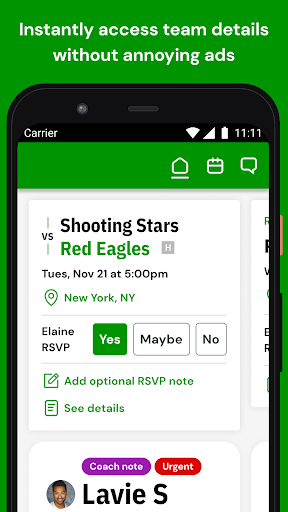
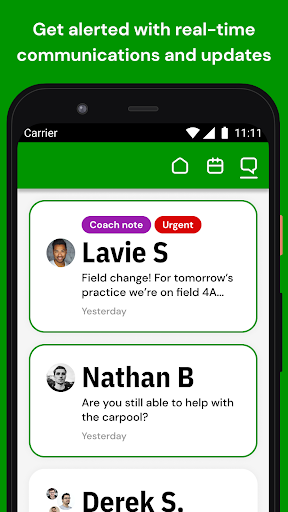
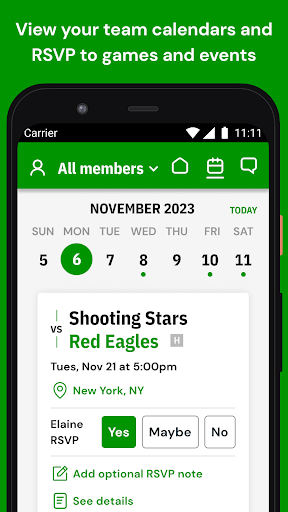
LeagueApps Play is a team management and communications app that is totally free for players, parents, coaches, staff, and admins to download––and it's ad-free too. You just need to be registered to a team or tournament supported by LeagueApps to use the Play app to view schedules and notifications, RSVP, send communications, and more. Simply sign in to the app with the same email and password credentials used when you registered for the team. Anyone can search for and follow publicly available tournaments—no login required. Family, friends, fans, recruiters, officials, etc. can find tournaments, follow their teams, view schedules and standings, and get push notifications for any game changes, and more. Play helps coaches and admins better manage their teams, communications, games and events—providing a better sports experience for parents and athletes! The app automatically syncs schedules, rosters, tournament brackets, and more, directly from LeagueApps, so there's no double data entry or extra maintenance required. Designated Coaches and Staff can use the Play app to: - Communicate high priority coach announcements which will be sent as emails and push notifications, and displayed as alerts in the app (so no one misses them!) - Create and manage games and events, with instant notifications - Add custom locations and include external teams when adding games and events - Send RSVP reminders and track attendance as your team arrives - Enter game scores directly in the mobile app - View roster and player details, including invoice status Players, Parents, Coaches, and Staff can use the Play app to: - View team schedules for all family members on teams and tournaments registered through LeagueApps - RSVP for games, tournaments, practices, and more, and view locations and directions - Reply to coach notes, send chat messages and photos, view organization announcements, and get real-time notifications, so you don't miss a beat - Register for open programs run by your team's organization - Manage your account settings and invoice payments - Quickly reference team rosters, and look up staff and guardian contact information - View automatically updated LeagueApps tournament brackets, league standings, and scores Organization admins can see exactly what their coaches and staff see—across their entire organization: - Pin priority programs and teams so you can quickly access them - View all teams' schedules, members, details, chats, and announcements; and moderate chat messages - Search for members, teams, and programs across your organization - Schedule and edit games and events for teams - Create custom locations and external teams - Access player payment information and contact guardians via text and email - Send messages, RSVP reminders, and take attendance - Switch between coach, parent, and admin views if you hold multiple roles - Target teams with important announcements from the LeagueApps dashboard LeagueApps is the leading youth sports management platform. We provide organizations with the technology and professional development they need to operate, engage, and win while also having a positive impact on kids and communities. Learn more at www.leagueapps.com. https://leagueapps.com/terms/ https://leagueapps.com/privacy-policy/ https://leagueapps.com/security-policy/
What's New
Latest version 5.3.1 with bug fixes and performance improvements
Enhanced security and stability
Optimized for better user experience
Kullanıcı Yorumları
10 yorum
L A
5 ay önce
Can't search messages, not enough notification options, the colors are nice and visually clear. Just not enough features to manage team parents.

Jojo
2 yıl önce
2 stars for the fact I can see my kids' teams and schedules. However, the chat feature just stopped working and kicked me out. I get "forbidden" and "error occurred" pop ups anytime I try to open them up. As the entire team is communicating, I cant get past the preview I get from the notification from my home screen. It's been very frustrating. I emailed the company and they claim to be working on it. Then I email again for an update and get passed to another engineer. Hopefully NYS catches on..

Mahria Fink
7 ay önce
After the latest update the Account button (the person icon) is so high on my screen that it doesn't work. we also have not been able to sync calendars with Google calendar since we started using it a month ago. It's great to have a chat and calendar in one place but having to manually add items to our Google calendar isn't helpful
Hey Mahria - sorry for the frustration. Grab the latest update and the account button issue should be fixed. Haven't seen the issue with calendar sync - shoot me an email to jclark@leagueapps.com and I will investigate. Thanks!
Developer
Trusted developer with verified applications on our platform.
App Information
Download Stats
Safe Download
This app has been verified and is safe to download. No malware detected.
You Might Also Like
More apps from Sports category