
Screenshots





About this app
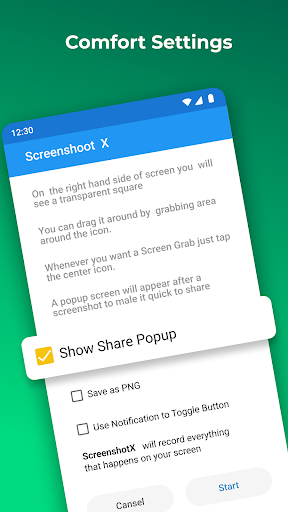
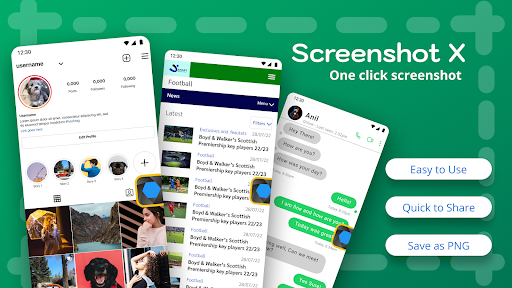
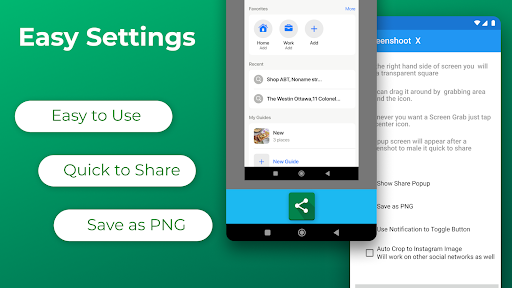
Capture screenshots with one click! Screenshot X - Screen Capture Tool - the fastest and easiest way to take and share screenshots! Powerful Screenshot Tool - Capture Screenshots in 1 click! Download Screenshot X, a FREE screen tool to instantly capture screens and share screenshots. Just open the app (snipping tool), and an icon will appear on your phone's screen. Tap on the icon anytime you want to grab a screenshot. Then you can immediately share or save the screenshot through other apps: messaging apps, emails, clouds, photo editing, or other phone tools! Screen Capture for all device types ✅ Tired of trying to capture screenshots with one hand or even two? With bigger phones, capturing the screen by pressing two buttons simultaneously is hard, and so are other gestures that mess up the screen. What if we tell you that we can help you to capture it in less than a second with only one tap of your finger with our handy screenshot capture tool? It's a flexible screen capture app that lets you share screen shots with anyone using phone tools already installed on your phone. Simple. Easy. Useful. And FREE! BENEFITS OF USING SCREENSHOT X - SCREEN CAPTURE TOOL: ✅ ONE TAP screen capture. Just tap on the icon, and our app will instantly capture a screenshot. ✅ Seeing something nice or funny on Instagram or chat sessions? Capture Screen with Screen Grabber feature! ✅ No one will know you've taken the screenshot. One tap on your phone screen, and you're done. ✅ Share the screen record through other apps: Emails, Facebook, Photo Editing apps, Cloud Service, or any phone tools you have. ✅ Move around the" capture screen" icon to anywhere on the screen for more comfortable viewing. ✅ Screenshot X - Capture Screen Tool saves each screenshot in a new picture file called Screen Grabs. Want to see your contacts list from months ago? Easy, if you grab a screenshot of those important clients' phone numbers. The snapshot of your screen is saved in the file labeled Screen Grabs. Want to send a map or directions to your technically-impaired friends? It doesn't get any easier than clicking (screen capturing) and sending the screenshot or screen record. Discover a powerful tool! Pictures, app icons, maps, tools, contacts, addresses – no matter what's showing up on your screen, you can capture it with Screenshot X and save screenshots in one place, so you don't have to fumble for what you need now. Enhances your Android experience in every way with Screenshot X - Screen Capture Tool!
What's New
Latest version 2.102.7 with bug fixes and performance improvements
Enhanced security and stability
Optimized for better user experience
Kullanıcı Yorumları
10 yorum
A Google user
7 yıl önce
Love it! I don't know what the problem is with the others who are saying that it doesn't work, it would be great if you could hide the icon, doesn't save the screenshots anywhere. It worked first time for me on my Xiaomi A2, saves the grab in Picture/Screenshots and works perfectly from the pulldown notifications bar and all without annoying ads. What more can one want from a totally FREE application! We'll see what the future brings but for now, it's perfect. Thanks a lot for this great app. A+++ 👍
SAMAH (MESSI)
4 yıl önce
Very easy to use and not cumbersome, used it on another device so I'm used to it. Would like to see an option to screen shot full screen. What I noticed is that areas not visible on the screen cannot be screenshot. I used an app that ask if you want to screenshot whole or part. If select whole, that which you cannot see on screen will be screenshot as well. App is now failing. When the app is set up, afterwards it needs resetting again and again.
A Google user
6 yıl önce
Perfect for me since my volume down button just broke, making the phone unable to take screenshots the default way. Would be nice if we could specify a save to location (SD card INSTEAD of internal storage). It saves everything to the default Screenshots folder, which is in internal storage, which is always almost full, which is why I bought a bunch of huge SD cards. And as others have noted, we all tend to hit "Clear All" to get all the open app windows out of the way, that closes this app too.
Developer
Trusted developer with verified applications on our platform.
App Information
Download Stats
Safe Download
This app has been verified and is safe to download. No malware detected.
You Might Also Like
More apps from Photography category


Selfie Camera - Beauty Camera
iMediaStar


FaceFancy-Face Swap & AI Photo
SZYJ Technology


StyleSwap: Outfits & Faces
SkySoft Inc


AI Photo Editor: Gallery Vault
T21 Games


HD Camera: AI Beauty
UniStarSoft


Photo Album F-Stop Pro
Seelye Engineering