
Screenshots



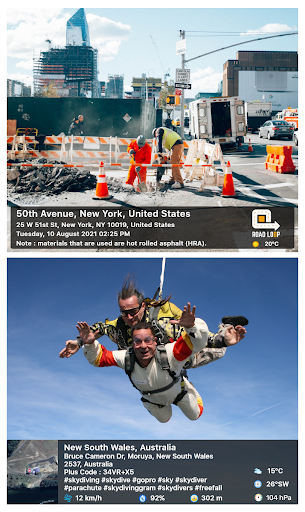


About this app
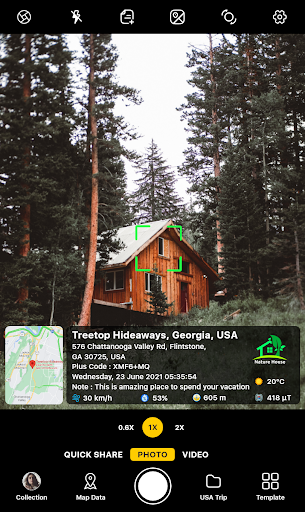
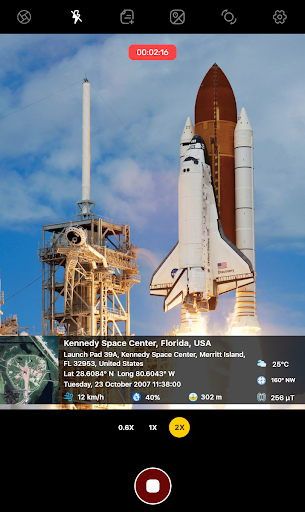
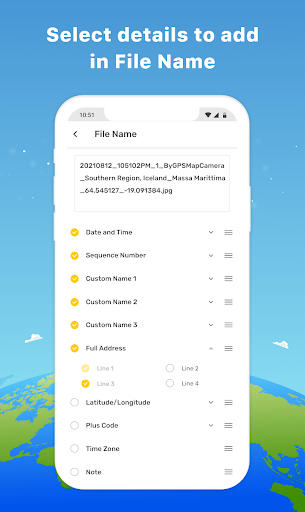
Looking for your travel memories or pictures of your visit to a particular place, with GPS map camera stamp application you can add datetime, live map, latitude, longitude, weather, magnetic field, compass & altitude to your camera photos. Track live location along with your captured photos by GPS map camera: Geotag photos & add GPS location app. send geotagged location of street/place added photos to your family & friends, and let them know about your best earth travel memories. How to add GPS map location on photos? ✔ Install GPS map camera: geotag photos & add GPS location application in your smartphone ✔ Open camera & select advanced or classic templates, arrange formats of stamps, change settings according to your requirement of GPS photomap location stamp ✔ Add geo location stamps automatically to your clicked pictures Interesting features: ➤ Get custom GPS camera with Grid, Ratio, Front & selfie camera, Flash, Focus, Mirror, Timer, dashcamera level, capture sound support, scenes & filters ➤ Set photo map data as automatic or manual ➤ QR code scanner for fast & easy to use scanning ➤ Classic template contains automatically fetched stamp details ➤ Advanced template contains: 1. Map options: Change photo map type from Normal, Satellite, Terrain, Hybrid options 2. Short Address: Auto add short location on photo 3. Address: Add your selected manual/automatic location on image 4. Lat/Long: Set GPS coordinates from DMS/decimal options for GPS stamp 5. Plus code: Accurate or concise code 6. Date & Time: Add date & timestamp from various formats as an image tag 7. Time zone: GMT, UTC timezones 8. Logo: Upload your brand logo 9. Note: Write relatable notes 10. Hashtags: add hashtags to photos with this GPS app 11. Weather: Either in fahrenheit or celsius, measure temperature units 12. Compass: Auto compass direction 13. Magnetic Field: Auto magnetic field camera 14. Wind: Measure Wind speed 15. Humidity: Auto Humidity measurement 16. Pressure: Measure pressure of the place 17. Altitude: It will automatically calculate altitude 18. Accuracy: Get auto accuracy on image Why have handy GPS camera app in your smartphone? ➝ To get satellite map stamp on photos while clicking ➝ For putting GPS map location stamp on photos ➝ Get focused clicks with geotag stamp & date stamp ➝ Find photo location stamp with geotagged camera at one place with this gps location tracker app ➝ To add date time stamp, which performs as both timestamper & date stamper ➝ Use as a date and time camera app to add date to your photos ➝ Works as GPS solocator & GPS note camera to stamp GPS details on photo ➝ Put Longitude, Latitude, Address, Date-Time, Location stamp to photos ➝ Utilize this quick & secure camera as GPS tracker on Photos ➝ To Get location image stamp with simple camera GPS → To get GPS stamp that have camera360 information of the place → Manually add GPS area in stamp to change location address → Work as a night hd camera+ to get clear pics Most efficient app for following groups of people: ➥ Travelers & explorers can effectively utilize geo-tagging camera app ➥ People associated with business related to real estate, infrastructure, architecture can easily apply GPS map location stamp to their site photos ➥ Individuals having destination celebrations of events like wedding, birthday, festival, anniversary, etc. can have their current GPS location stamp on the picture & use the app as a moment camera ➥ Anyone who wants to add GPS data on their photo as a GPS notecam can use the app. ➥ Persons having outstation meetings, conferences, conclaves, meetups, events arranged by companies or institutions solving and serving a particular purpose ➥ Travel, food, fashion & art bloggers can advance their experiences by adding GPS location through GPS map cam To experiment with such interesting features, MUST download GPS map camera: geotag photos & add GPS location app right now. Share your best experiences with us through rate & review.
What's New
Latest version 1.9.3 with bug fixes and performance improvements
Enhanced security and stability
Optimized for better user experience
Kullanıcı Yorumları
10 yorum
mart martin
3 ay önce
Easily the best Camera app I have right now. helps me in sorting my pics depending on specific locations that they were taken.
Thank you for your kind words! We’re glad GPS Map Camera is helpful. Don’t forget to share it with friends, family, and colleagues. They might find it useful too! If you have suggestions or need support, reach us at 📩 support@gpsmapcamera.com.

Ifran Ali
5 ay önce
Really like the app which I can use for Photos for my university works. One suggestion, I recently purchased the ad-free pro version, but I cannot use it on more than one device, which feels like a waste of oppurtunity. Atleast make it so that it can be used in two devices at the maximum, instead of purchasing everytime with the same account.
Hi! Thank you for your positive feedback and for purchasing our PRO version! We truly appreciate your support. Regarding your suggestion please contact support@gpsmapcamera.com

Nwabueze Onuoha
5 ay önce
This is a nice app, I like it everyday. But I'm experiencing one problem, it does not flash light in a dark place even when I put flash light always. I feel it has something to do with the phone. This is Samsung Ultra S25. Could it be checked and corrected? I will greatly appreciate it if you will take your time to study why it does not flash light in dark places even when turned on always in Samsung S25 Ultra. Help me do this, then I give it 5 stars.
Thank you for the kind words—and for flagging this! 🙏 Please send a short screen recording of issue you are facing to support@gpsmapcamera.com. We’ll investigate and fix—happy to earn your 5⭐ once it’s resolved!
Developer
Trusted developer with verified applications on our platform.
App Information
Download Stats
Safe Download
This app has been verified and is safe to download. No malware detected.
You Might Also Like
More apps from Photography category


Selfie Camera - Beauty Camera
iMediaStar


FaceFancy-Face Swap & AI Photo
SZYJ Technology


StyleSwap: Outfits & Faces
SkySoft Inc


AI Photo Editor: Gallery Vault
T21 Games


HD Camera: AI Beauty
UniStarSoft


Photo Album F-Stop Pro
Seelye Engineering