
Screenshots





About this app
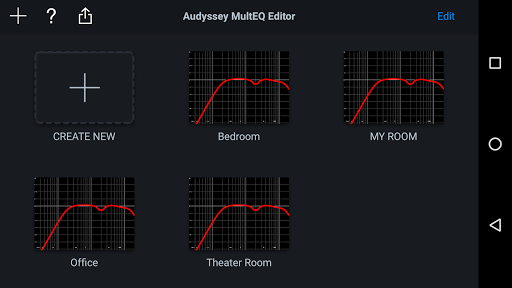
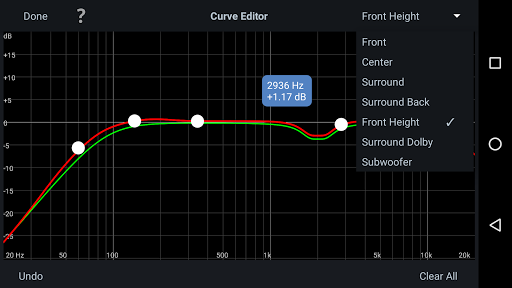
The latest Denon Marantz audio video products use Audyssey MultEQ for simple, accurate set-up calibration of your system to the room in which it’s used. But, now you can go further with the Audyssey MultEQ Editor app, going ‘under the hood’ to view and adjust settings for detailed tuning – allowing you to customize the sound more precisely to the specific problems in your room, and tailor the sound to your personal preferences. With this comprehensive app, you can harness the power of Audyssey MultEQ to take total control of the way your home cinema sounds. This app will allow you to: •View the speaker detection results, to check correct installation •View before and after results of the Audyssey calibration, making it easy to identify room problems. •Edit the Audyssey target curve for each channel pair to suit your tastes •Adjust the overall EQ frequency rolloff for each channel pair •Switch between 2 high frequency rolloff target curves •Enable/Disable midrange compensation to make the sound brighter or smoother •Save and load calibration results This app requires specific hardware in your product to function: please double-check that your Denon or Marantz model is supported - see list below - before purchasing. •Multi-Language Support (English, French, German, Spanish, Italian, Dutch, Swedish, Polish, Russian, Japanese and Simplified Chinese. The OS language setting is automatically detected; when not available, English is selected.) Compatible models: (Product availability varies depending on regions.) Denon AV Receiver: AVR-X6300H, AVR-X4300H, AVR-X3300W, AVR-X2300W, AVR-X1300W, AVR-S920W, AVR-S720W, AVR-S930H, AVR-S730H, AVR-X1400H, AVR-X2400H, AVR-X3400H, AVR-X4400H, AVR-X6400H, AVR-X8500H, AVR-S740H, AVR-S940H, AVR-X1500H, AVR-X2500H, AVR-X3500H, AVR-X4500H, AVR-X6500H, AVR-X1600H, AVR-X2600H, AVR-X3600H, AVR-S750H, AVR-S950H, AVR-A110, AVR-X6700H, AVR-X4700H, AVR-X3700H, AVR-X2700H, AVR-S960H, AVR-X8500HA, AVR-X1700H, AVR-S760H, AVR-A1H, AVR-X4800H, AVR-X3800H, AVR-X2800H, AVR-S970H, AVR-X1800H, AVR-S770H, AVR-X6800H, AVR-A10H Marantz AV Receiver: AV7703, SR7011, SR6011, SR5011, NR1607, NR1608, SR5012, SR6012, SR7012, SR8012, AV7704, AV8805, NR1609, SR5013, SR6013, SR7013, AV7705, NR1710, SR5014, S6014, SR8015, SR7015, SR6015, SR5015, NR1711, AV7706, AV8805A, AV 10, CINEMA 30, CINEMA 40, CINEMA 50, CINEMA 60, CINEMA 70s, AV 20 Not compatible with Denon and Marantz models other than those listed above. Compatible Android devices: •Android Smartphones with Android OS ver.5.0 (or higher) •Screen resolution: 800x480, 854x480, 960x540, 1280x720, 1280x800, 1920x1080, 1920x1200, 2048x1536 * This application does not support smartphones in QVGA (320x240) and HVGA (480x320) resolution. * This application does not support smartphones of less than 2GB RAM capacity. Confirmed Android devices: Samsung Galaxy S10 (OS 12), Google (ASUS) Nexus 7 (2013) (OS 6.0.1), Google (LG) Nexus 5X (OS 8.1.0), Google Pixel 2 (OS 9), Google Pixel 3 (OS 12), Google Pixel 6 (OS 13) Caution: We do not guarantee that this application works with all Android devices.
What's New
Latest version 1.13.5 with bug fixes and performance improvements
Enhanced security and stability
Optimized for better user experience
Kullanıcı Yorumları
10 yorum
A Google user
6 yıl önce
This app worked for me without any problems or hiccups. It allows you to edit some of the parameters that Audyssey uses and then transfer the edited version to your receiver. I'm using a Denon AVR-x3500, which is listed as one of the supported devices in the app information page. It is a little tacky that, after buying a Denon receiver, one is expected to cough up $20 for an app that should have been included in the purchase price. That said, if you're finicky about your sound, it's well worth the price.

John Mastroleo
3 yıl önce
I think it works quite good. I always do a complete reset before I run a new calibration. The slow part is transferring the massive file to the receiver/processor but once received it apply room correction quite fast. You can copy each file you have loaded to the receiver/processor from the EQ Editor then copy those settings to a USB stick. You simply use the USB copied sticks instead of loading from the Editor. Saves lots of time. I like using a tablet instead of phone. Well worth $20.00.
A Google user
6 yıl önce
Could not find my Marantz receiver until i rebooted my my router/modem. If you have trouble moving the frequency slider on a note 10 or other Samsung phones go to settings/display/full screen apps click on three little dot's on the top right corner and switch to hide camera cutout. after all that it worked great for me. the app gives you much more control and makes it easy to compare different settings.
Developer
Trusted developer with verified applications on our platform.
App Information
Download Stats
Safe Download
This app has been verified and is safe to download. No malware detected.
You Might Also Like
More apps from Music & Audio category
Audio Elements Pro
Rokaud


Spotify: Music and Podcasts
Spotify AB

Bose QC Earbuds
Bose Corporation
AudioLab Audio Editor Recorder
HitroLab - Mp3 Audio Editor and Ringtone Maker Dev

Musivibe - Enjoy Various Music
Acunsewer Media

AudioTool
jjbunn