
Screenshots


About this app
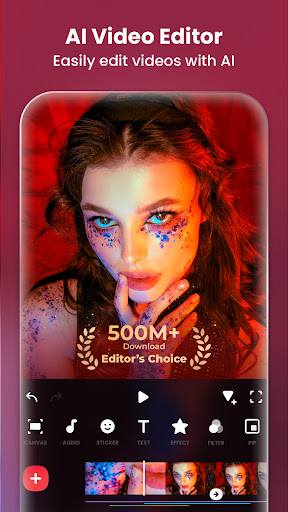
InShot - Powerful all-in-one Video Editor and Video Maker with professional features. Add music, text, transition effects for videos, make smooth slow motion, make video collage, blur background and etc! As an easy-to-use editing app, InShot makes creating vlogs a breeze and helps you to become an influencer on YouTube, Instagram, TikTok, WhatsApp, Facebook, etc. InShot is also a photo editor and collage maker. Edit pictures and selfie, remove bg, add filters, adjust HSL, etc. Make stylish Instagram story covers and posts. Features: AI Tool - AI Body Effects. Experience the magic of AI with instant presets that elevate your images and videos in just one tap. - Auto Captions. AI-powered speech-to-text tool helps you say goodbye to manual text typing and makes video editing effortless. - Auto Remove Background. Remove background of videos/photos at the touch of a button. - Smart tracking. Make stickers/text move seamlessly in sync with your tracking object motion, adding dynamic flair to your videos. - Smooth slow-mo. Experience seamless slow-motion effects for buttery smooth videos. Full-featured Video Editing - Trim/Merge clips. Combine and compress video without losing quality. - Reverse videos. - Add text, emoji and InShot exclusive stickers. - Add music, sound effects & voice-overs. - Add various-styles voice effects. - Adjust ratio. Fit your video and photo in any aspect ratio. - Speed control. Speed up/slow down video. Add speed ramping. - Keyframes editing. Add custome keyframe animations. - Chromakey. Easily edit green screen video. - Picture-in-Picture. Create multi-layered videos. - Mixtures. Blend your video with blend mode. - Color picker. Pick any color on the screen and apply it to the background/text. Filters, Effects & Transitions - Lots of cinematic filters. - Adjust video brightness, contrast, saturation, etc. Customized video filters and video effects. - Unique effects such as Glitch, Fade, Noise, Beats, Weather, Retro DV, celebrate, etc. - AI effects. Clone, stroke, auto-blur, etc. - Pro editing app with super transitions. Combine two clips with transition effects. Photo Editor & Collage Maker * Blur the background easily. * 1000+ stickers, funny memes, texts & backgrounds. * Turn blurry photos into HD with AI Photo Enhancer. * Remove unwanted objects effortlessly—choose between advanced AI or quick manual tools. * Easy-to-use photo grid collage maker. 100+ highly editable collage layouts available. * Pic Stitch. Horizontal, vertical, or automatically recognize subtitles. Canvas & Background - Choose from various background patterns or upload your own pictures. - Adjust video ratios for Instagram/TikTok/Youtube post. Easy to Share - Custom video export resolution, HD pro video editor support 4K 60fps export. - Share your daily life on social media: Instagram Reels, TikTok, Whatsapp Status, YouTube Shorts, etc. InShot is an editing app for videos and photos. With InShot - video maker with music, you can easily make basic video and even advanced assets like video collage, smooth slow motion, stop motion, reverse video and more. Share your vlogs to social media to get more likes, or edit video with music and pic for TikTok. Any questions for InShot (FREE slow motion video editor with music & photo slideshow maker)? Please contact us at inshot.android@inshot.com For more new feature tutorials and advanced video editing tips, please subscribe to our YouTube channel: https://www.youtube.com/@InShotApp Disclaimer: InShot is not affiliated, associated, sponsored, endorsed by, or in any way officially connected with YouTube, Instagram, TikTok, WhatsApp, Facebook, Twitter.
What's New
Latest version 2.175.1517 with bug fixes and performance improvements
Enhanced security and stability
Optimized for better user experience
Kullanıcı Yorumları
10 yorum
Kanwal Fatima
8 ay önce
I've been using this app for years now and I love it. The only problem it has is that Instagram had an update where the preview of reels is elongated and so the Instagram sized canvas option is not suitable anymore since it's too short for the current preview on insta. Please update this so that the thumbnail is according to the current Insta preview
Zero 7.02
1 yıl önce
Genuinely the best free editing app I've used so far. There is a subscription for certain things, but you can also watch an ad to use most things that are exclusive to subscribers. Pretty sure I'm gonna use this app for a while. One small addition would make it even better though. In the voice effects in the audio section, it'd be really nice to be able to adjust the strength of the effects, similar to the "curve" in the speed section. Other than that, it's literally perfect!

Lynsage Carranza
6 ay önce
I've been using this since i became an youtuber. This is very cool and the editing is easier and faster because of the "add to all" button. I can easily arrange the durations and the sizes. I also suggest more effects stickers and letters fonts that are for free. I couldn't use the other ones that needed cash that makes my editing little bit difficult. I also suggest for thumbnail edit because i wanted to make the thumbnail more artistic and make the easy title edit. That's all thnx for reading.
Developer
Trusted developer with verified applications on our platform.
App Information
Download Stats
Safe Download
This app has been verified and is safe to download. No malware detected.
You Might Also Like
More apps from Photography category


Selfie Camera - Beauty Camera
iMediaStar


FaceFancy-Face Swap & AI Photo
SZYJ Technology


StyleSwap: Outfits & Faces
SkySoft Inc


AI Photo Editor: Gallery Vault
T21 Games


HD Camera: AI Beauty
UniStarSoft


Photo Album F-Stop Pro
Seelye Engineering