

Screenshots




About this app
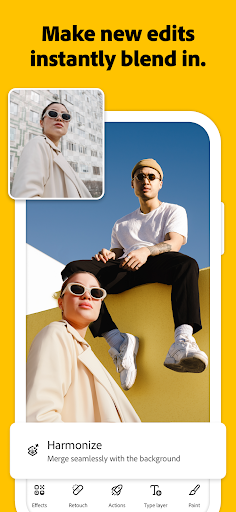
Photoshop on mobile includes a wide selection of free features to accomplish all the core photo editing capabilities. Whether you're new, curious, or already familiar with Photoshop, we’ve made it easier than ever to learn and expand your creative skills. Photoshop on mobile simplifies your creative & design needs: ⦁ Add new objects ⦁ Blur or remove backgrounds ⦁ Replace backgrounds and remove unwanted objects ⦁ Retouch, refine and perfect your images with targeted adjustments ⦁ Combine multiple images to create high-quality compositions and explore intuitive AI tools ⦁ Create unique collages, album cover art, perfect your passion projects, and develop unique digital art—all in one place There is no limit to what you can create. KEY FEATURES ⦁ REMOVE OR REPLACE BACKGROUNDS ⦁ Effortlessly select the background with the Tap Select tool. ⦁ Easily replace backgrounds with an image directly from your phone, create AI-generated backgrounds with Generative Fill, or select from a large library of Adobe Stock images, including textures, filters and patterns. ⦁ Adjust the background, including the brightness, effects or vibrancy to bring your creations to life. REMOVE UNWANTED DISTRACTIONS ⦁ Brush out blemishes, spots, or small imperfections in seconds using the Spot Healing Brush. ⦁ Quickly and easily remove unwanted content from your images with our powerful Generative Fill feature. PERSONALIZED IMAGE DESIGN ⦁ Create stunning visual images that are uniquely yours by blending photos, graphics, text, utilizing effects and more. ⦁ Combine unique elements from your own photos with a selection of free Adobe Stock images, including textures, filters, fonts and patterns, to elevate your final creations. ⦁ Effortlessly select an object or person with the Tap Select tool. ⦁ Rearrange objects in your image and control how they come together with layers. ⦁ Easily add and remove content from your photos using simple text prompts with Generative Fill. Additionally, ideate, create new assets, and jumpstart your creativity using Generate Image. BRING COLOUR AND LIGHT TO LIFE ⦁ Adjust the colour of anything, like your shirt, pants or shoes, using adjustment layers. Use the Tap Select and other selection tools to perfectly edit the brightness or vibrancy to add a pop of colour to your images. PREMIUM ⦁ Upgrade to the Photoshop Mobile & Web plan for enhanced control and precision. ⦁ Easily remove entire objects just by brushing over it, and have the background filled in automatically with the Remove Tool. ⦁ Seamlessly fill selected portions of an image with content sampled from other parts of the image with Content Aware Fill. ⦁ Quickly and precisely select people and objects like plants, cars, and more with enhanced precision using Object Select. ⦁ 100 generative credits to add, expand, design or remove content from your images. In addition, ideate, create new assets, and generate your creativity using the latest features like Generate Image. ⦁ Change unique layer interactions to control transparency, colour effects, filters and add style to your images with Advanced Blend Modes. ⦁ Export in additional file formats (PSD, TIFF, JPG, PNG) and export options for print quality and compression. Device Requirements Tablets and Chromebooks are currently not supported. TERMS & CONDITIONS: Your use of this application is governed by the Adobe General Terms of Use http://www.adobe.com/go/terms_linkfree_en and the Adobe Privacy Policy http://www.adobe.com/go/privacy_policy_linkfree_en Do not sell or share my personal information: www.adobe.com/go/ca-rights-linkfree
What's New
Latest version 1.1.0.2227 with bug fixes and performance improvements
Enhanced security and stability
Optimized for better user experience
Kullanıcı Yorumları
10 yorum
you you
5 ay önce
very good photo editor app but The program is heavy and There are many paid features As it is the first version, I hope that you will change these obstacles because it is a really great application and everyone deserves to have it.
Hi there, thank you for your feedback! We hear you on the performance and paid features — and we’re working to improve both. That said, we also want to highlight that many free features are available for you to explore, including powerful editing tools, layer support, and adjustment options. Stay tuned for future updates! ^RS

Kanishka Prakash
5 ay önce
absolute W from Adobe, great app , smooth, one thing that ill suggest that is to advertise this app more , it doesn't even come on top on searching photoshop, express one comes
Hi there, we're thrilled you're enjoying the app and really appreciate your suggestion. Visibility is super important, and we're working on improving discoverability so it's easier to find — especially when searching for Photoshop. Stay creative and keep the feedback coming! ^RS

Mejohn Binoy
5 ay önce
The app is currently the best photo editor. The UI is a bit tricky but you'll get used to it as you work through projects. The only problem I face is masking, as you are not able to see the underlying layer as you could in Photoshop PC. You can invert a mask but cannot freely brush back the areas you need. This makes it very difficult to work with a mask. Also, some blending modes need a subscription. Blending modes are the most required layer effect needed for editing, please make it free.
Hi there! Thanks for your feedback. We understand the importance of masking and blending modes. Some blending modes are included in the premium plan, but your feedback is valuable and will be shared with the team. We’re also continually working on improving masking tools to make layer editing more intuitive on mobile devices. ^RS
Developer
Trusted developer with verified applications on our platform.
App Information
Download Stats
Safe Download
This app has been verified and is safe to download. No malware detected.
You Might Also Like
More apps from Photography category


Selfie Camera - Beauty Camera
iMediaStar


FaceFancy-Face Swap & AI Photo
SZYJ Technology


StyleSwap: Outfits & Faces
SkySoft Inc


AI Photo Editor: Gallery Vault
T21 Games


HD Camera: AI Beauty
UniStarSoft


Photo Album F-Stop Pro
Seelye Engineering